 AppVerz
Blog / 7 November 2026
SweepyMac is up to 66% off: every plan, and the eleven tools it pays for
Every SweepyMac plan is discounted right now: annual from $14.99 instead of $24.99, buy once from $59.96 instead of $149.99. The six prices side by side, which one to pick, and what the app does for the money, from Smart Scan and Mac Health to Space Lens, the uninstaller and Cloud Cleanup.
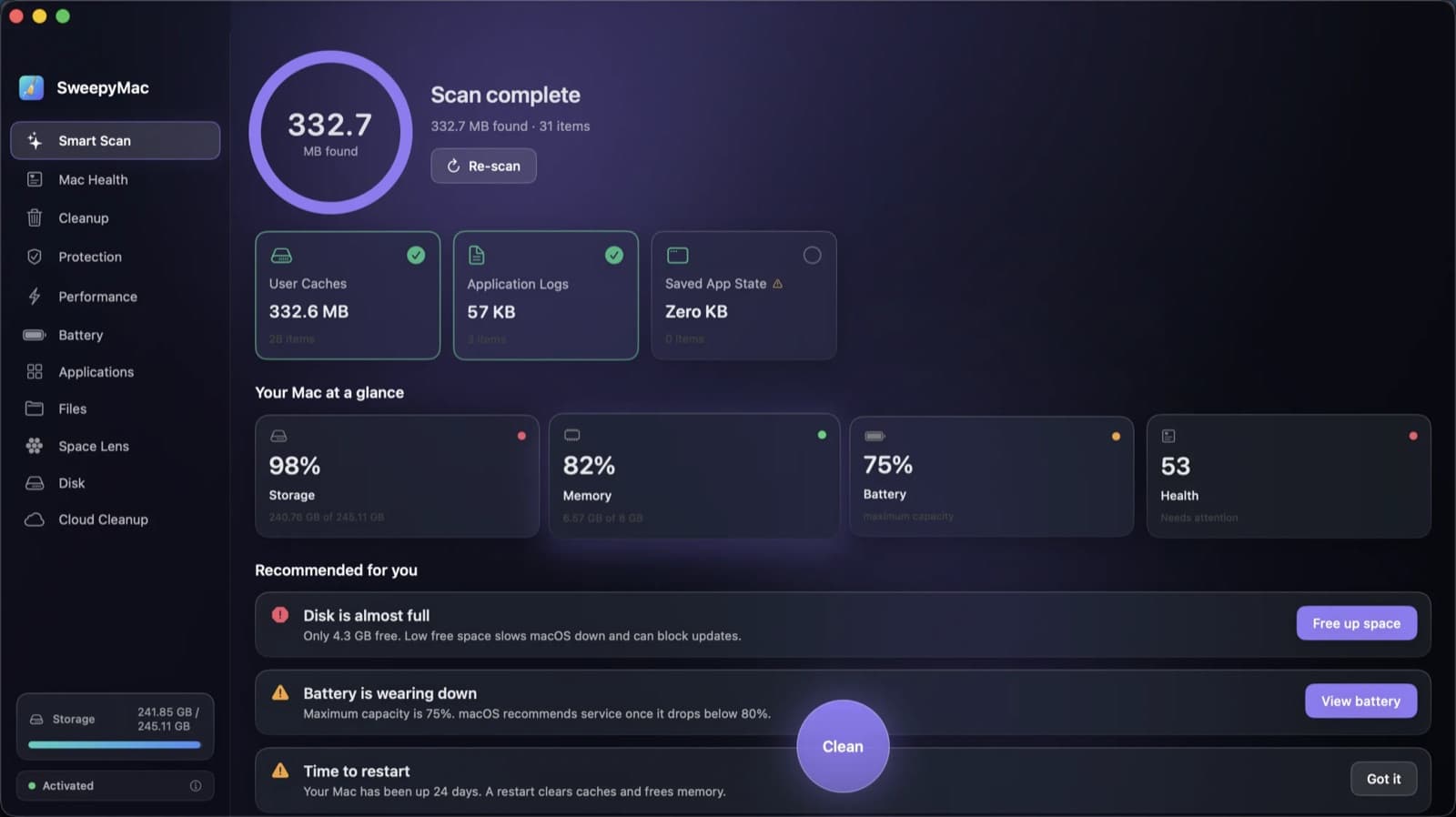
Every SweepyMac plan is on sale. Annual starts at $14.99 a year instead of $24.99, and buying it outright starts at $59.96 instead of $149.99. The discount grows with the plan, up to 66% off a five-Mac licence you buy once. Here are the six prices, how to choose between them, and what the app does for the money.
The prices below are the ones on the day this post went up. The buy page always shows the current price beside the list price.
The six prices
| Plan | Macs | Price | List price | You save |
|---|---|---|---|---|
| Annual | 1 | $14.99 a year | $24.99 | $10.00 (40%) |
| Annual | 2 | $29 a year | $49.99 | $20.99 (42%) |
| Annual | 5 | $59 a year | $119.99 | $60.99 (51%) |
| Buy once | 1 | $59.96 | $149.99 | $90.03 (60%) |
| Buy once | 2 | $116 | $299 | $183 (61%) |
| Buy once | 5 | $236 | $699 | $463 (66%) |
Which one to pick
Annual is the cheapest way to have SweepyMac for a year or two, and the right default for most people. It renews each year until you cancel, which you can do at any time from the link in your receipt email.
Buy once costs exactly four annual payments at every seat count: $59.96 is four times $14.99, $116 is four times $29, $236 is four times $59. Use the same Macs for more than four years and it works out cheaper. It also carries the biggest discount, so if you were going to buy outright anyway, now is the time.
Seat count follows your Macs, not your people. A laptop and a desktop want the two-Mac plan, and five Macs cost about four times one, not five.
Annual or once covers the rest: activating a key, moving it to a new Mac and what the licence check sends.
What you are buying
SweepyMac is eleven native tools in one window. It is built around one rule: show what it found, say why it is safe, and make every removal reversible.
Smart Scan and Mac Health
Smart Scan sweeps user caches, application logs and saved app state in one pass and totals up what you can reclaim. Only the conservatively safe categories arrive selected, and nothing is cleaned until you press Clean. Mac Health turns storage, memory, battery and startup load into one score out of 100, with recommendations written as sentences, such as "Disk is almost full", each with a button that jumps to the module that fixes it. More in the Mac Health score explained.
Cleanup, Trash-first
Nothing is hard-deleted. What SweepyMac removes goes to your Trash, every destructive action has an in-app Undo, and each group opens up to show which files are inside and why they are safe to touch. Smart Scan vs Cleanup explains when to use which, and the one delete path explains why there is only one way anything gets removed.
Protection
Two parts. Privacy clears history, cache and cookies for Chrome, Brave, Edge, Arc, Vivaldi, Chromium and Firefox, one row per profile, with nothing ticked until you choose. Safari gets its cache only, because macOS keeps Safari's history and cookies off-limits to every other app. Malware checks your Mac against a signed definitions file, which the app verifies before trusting a byte of it. See clearing browser data on a Mac and what the malware scanner actually checks.
Performance
Live CPU, memory and disk meters above three one-click chores that otherwise mean Terminal: free up inactive memory, flush the DNS cache, and run macOS's own maintenance scripts. Your login items are listed too, with a Disable button. Login items and maintenance has the details.
Battery
Charge, maximum capacity, charge cycles and condition, read straight from macOS and refreshed every five seconds. It is read-only by design: no software can restore a worn battery, so it shows you the real numbers to decide about a replacement. Reading your Mac's battery health explains what the numbers mean.
Applications: uninstall means uninstall
Dragging an app to the Trash leaves its preferences, caches and launch agents behind. The Applications module takes them along with it, into the Trash, so even a full uninstall can be undone. See uninstalling a Mac app completely.
Files: the big and the twice-saved
Point it at any folder to find what is actually taking the room, or to hunt duplicates: byte-identical copies, not lookalikes, with one copy of every set always left behind. Guides: large and old files and duplicate files.
Space Lens and Disk
Space Lens draws every folder as a bubble you can click into while it is still measuring. Disk draws the whole volume to scale. When something cannot be fully measured, both say so instead of inventing a number. More in two views of a full Mac.
Cloud Cleanup
Space back without deleting anything. Cloud Cleanup removes the local copies of iCloud Drive files you have already downloaded. They stay in iCloud, the Finder still lists them, and opening one brings it back. See iCloud Drive space without deleting.
Nothing leaves your Mac
No account, no telemetry, no analytics. Scans run on your Mac and their results stay there. Besides checking your licence and fetching signed updates, the app fetches only its malware definitions file. Why our apps send nothing home goes into it.
Try it, then buy
The download runs the full app, every module, free for three days. There is no account and no card. Run a scan, look at your health score, find your largest files, and decide. Your first ten minutes with SweepyMac is a good route through the trial.
When you are ready, pick a plan on the buy page. Dodo Payments takes the payment, issues the receipt and emails you the licence key; card details never reach us. Paste the key into the licence badge at the bottom of the sidebar, and SweepyMac keeps itself up to date from then on. Purchases made directly from us can be refunded within fourteen days, no questions asked, under the refund policy.
Questions people ask
- How much is SweepyMac right now?
- Annual is $14.99 a year for one Mac (list $24.99), $29 for two (list $49.99) and $59 for five (list $119.99). Buy once is $59.96 for one Mac (list $149.99), $116 for two (list $299) and $236 for five (list $699). The buy page always shows the current prices beside the list prices.
- Annual or buy once?
- Buy once costs exactly four years of the annual plan at every seat count. If you expect to use SweepyMac on the same Macs for more than four years, buy once is cheaper; otherwise annual is.
- Can I try it before I pay?
- Yes. The download runs the full app, every module, free for three days, with no account and no card. A licence key activates it when you are ready.
- Is anything deleted permanently?
- No. Everything SweepyMac removes goes to your Trash, and every destructive action has an in-app Undo. Nothing is gone until you empty the Trash yourself.
Related reading
- Your Mac's disk is almost full. Here is the order to free it inLook before you delete, take the reversible wins first, hand space back to iCloud, clear what your tools rebuild, then go after the big files, and empty the Trash last, because until you do, nothing you removed has freed a byte.
- SweepyMac and Stackyard on the same Mac: where they overlap, and which to reach forBoth clean caches, both find duplicates and big files, both uninstall apps properly, and both send everything to the Trash. Tool by tool, where the two apps do the same job, where one goes further, and which one a developer actually needs.
- Why is my Mac slow? A six-point checklist, in the order worth checkingA slow Mac is almost always one of six things: memory pressure, one process burning the processor, a nearly full disk, too much starting at login, weeks without a restart, or dev processes nobody is watching. How to tell which, and where SweepyMac and Stackyard show it.
Have a question about any of this?
Write in. The person who built the apps reads every message and replies within two working days.