 AppVerz
Blog / 18 October 2026
What SweepyMac's malware scanner actually checks, and what it is not
Launch agents by name, file contents by hash and byte pattern, code signatures, cron jobs and browser extensions. What each signal means, why a finding is labelled by how it was found, and why an on-demand scanner is a complement to macOS, not a replacement for it.
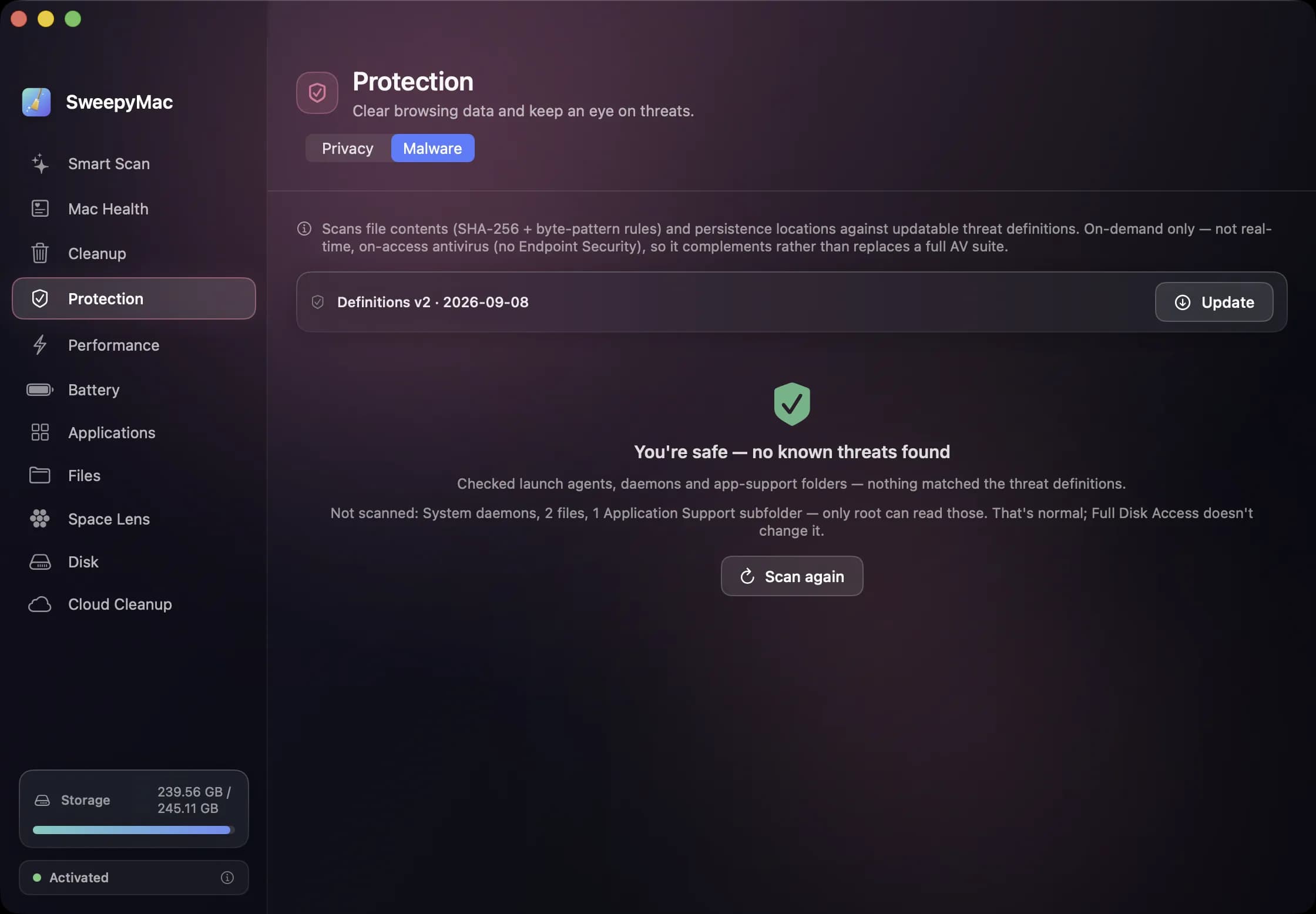
The word "malware scanner" covers everything from a background engine that inspects every file as it is written to a script that greps for three known names. SweepyMac's sits in a specific place on that range, and we would rather describe it precisely than let the label do the work. Here is what the Malware tab in Protection does when you press Scan now, signal by signal.
Five signals
Persistence by name. The scanner reads your launch agents and daemons, the things that start automatically, and the app-support folders beside them, and compares their names against known-threat signatures. Adware on the Mac overwhelmingly survives by installing a launch agent, so this is the highest-yield check.
File contents. For candidate files, up to a cap of five thousand, it computes a full SHA-256 hash and checks it against a known-bad list, then scans the content against byte-pattern rules. Files over 100 MB are pattern-scanned but not hashed. The pattern engine is a deliberately small one: patterns are plain text or hex with wildcards, evaluated against a single buffer, and rules that are too broad to be meaningful are dropped before they can flag half the disk.
Code signatures. Launch items are checked for a valid signature, and an unsigned one is flagged as "Unsigned launch item". This is a prompt to look, not a verdict. A finding based on a signature alone is never removable from inside the app, because unsigned is not the same as malicious.
Cron jobs and browser extensions. Both are scanned, and both are treated as references rather than files. A cron line can name any path on the disk, so the scanner reports what it found and never lets a cron or extension finding drive a removal on its own.
Quarantine provenance. Where a file arrived through a download, macOS records that, and the scanner reads it as supporting context: a downloaded file matching a rule is more worrying than a system one.
How to read a finding
Each result shows a severity, Suspicious, Adware or Malware, the signal that found it, the path, and a corroborated badge when more than one signal agrees. The badge matters. A name match alone can be a coincidence; a name match plus a content hash is not. A clean scan reads "You're safe — no known threats found", which is the exact claim being made: no known threats. Not "your Mac is secure."
Under the result is the part most scanners leave out. "Couldn't check everything" lists folders that could not be read, and "Not scanned" lists the locations only the root user can see. The scanner runs with your permissions, so it cannot look there, and granting Full Disk Access does not change that. We show the list because a sweep that silently skipped it would be claiming coverage it did not have.
Removing something
A user-level finding, in your own Library, goes to the Trash with Undo, the same as everything else in SweepyMac. The result bar reads "Quarantined N items" and you can put them back.
A system-level finding, in a place like /Library/PrivilegedHelperTools, cannot be moved by a normal user. Here the app offers Reveal, which shows it in Finder so you can deal with it yourself, or Remove, which asks for an administrator password, unloads the background service and permanently deletes the file. That path has its own confirmation and no Undo, and it is one of only two permanent actions in the whole app. The other is Empty Trash. A help card beside it walks through manual removal if you would rather do it by hand.
Definitions
The scanner ships with a built-in rule set and a card showing its version and date. Pressing Update fetches a signed definitions file; the signature is verified against the downloaded bytes before anything is used, and a file that fails verification is discarded while the existing definitions stay in place. There is no way to bypass that check. The card warns when the definitions are more than thirty days old. This update is the one network request SweepyMac makes apart from licence validation, which we wrote about in why our apps make no network requests.
A second card shows the status of XProtect, Apple's own built-in protection, and warns if it is out of date, pointing you to the Software Update setting that keeps it current. That card is there because XProtect is the real-time layer on a Mac, and SweepyMac's job is to sit beside it, not in front of it.
What it is not
It is not real-time. It runs when you press the button. It is not a full antivirus and does not inspect network traffic, email or files as they arrive. It is a focused sweep for the way adware and known malware persist on a Mac, with results you can read and actions you can undo. Used alongside XProtect and ordinary caution about what you install, it covers the ground where most Mac infections actually live. Used alone, it is not enough, and the app's own guide says so in bold.
Questions people ask
- Is SweepyMac an antivirus?
- No. It is an on-demand, signature-based scanner for known adware and malware persistence on a Mac. It runs when you press Scan now, not in the background, and it complements macOS's built-in XProtect rather than replacing it.
- Why does it say some locations were not scanned?
- Those are places only the root user can read. The scanner runs as you, so it cannot look there, and Full Disk Access does not change that. Listing them is more honest than pretending the sweep covered them.
- Will it delete an unsigned app?
- Never on its own. An unsigned launch item is flagged so you can look at it, but a signature-only finding is not removable from inside the app. Plenty of legitimate software is unsigned.
Related reading
- Why our apps make no network requests, and the one exceptionFocusLens has no network code at all. SweepyMac has one connection, for a signed malware definitions file. Here is what no telemetry means in practice, what we give up for it, and how you can check the claim yourself.
- Annual, monthly or once: choosing a SweepyMac plan, and moving a licence between MacsThree ways to pay, for one, two or five Macs, after a three-day trial with no account. What each plan costs, where the break-even points are, how a key activates and moves to a new Mac, and what the licence check sends.
- The orange triangle: what SweepyMac does when it cannot see somethingEvery scanner meets folders it cannot read. The dishonest ones leave them out and show you a clean total. SweepyMac marks incomplete lists, lists the locations it could not scan, skips health checks it cannot measure, and labels space a deletion would not actually free.
Have a question about any of this?
Write in. The person who built the apps reads every message and replies within two working days.