 AppVerz
Blog / 10 October 2026
Why our apps make no network requests, and the one exception
FocusLens has no network code at all. SweepyMac has one connection, for a signed malware definitions file. Here is what no telemetry means in practice, what we give up for it, and how you can check the claim yourself.
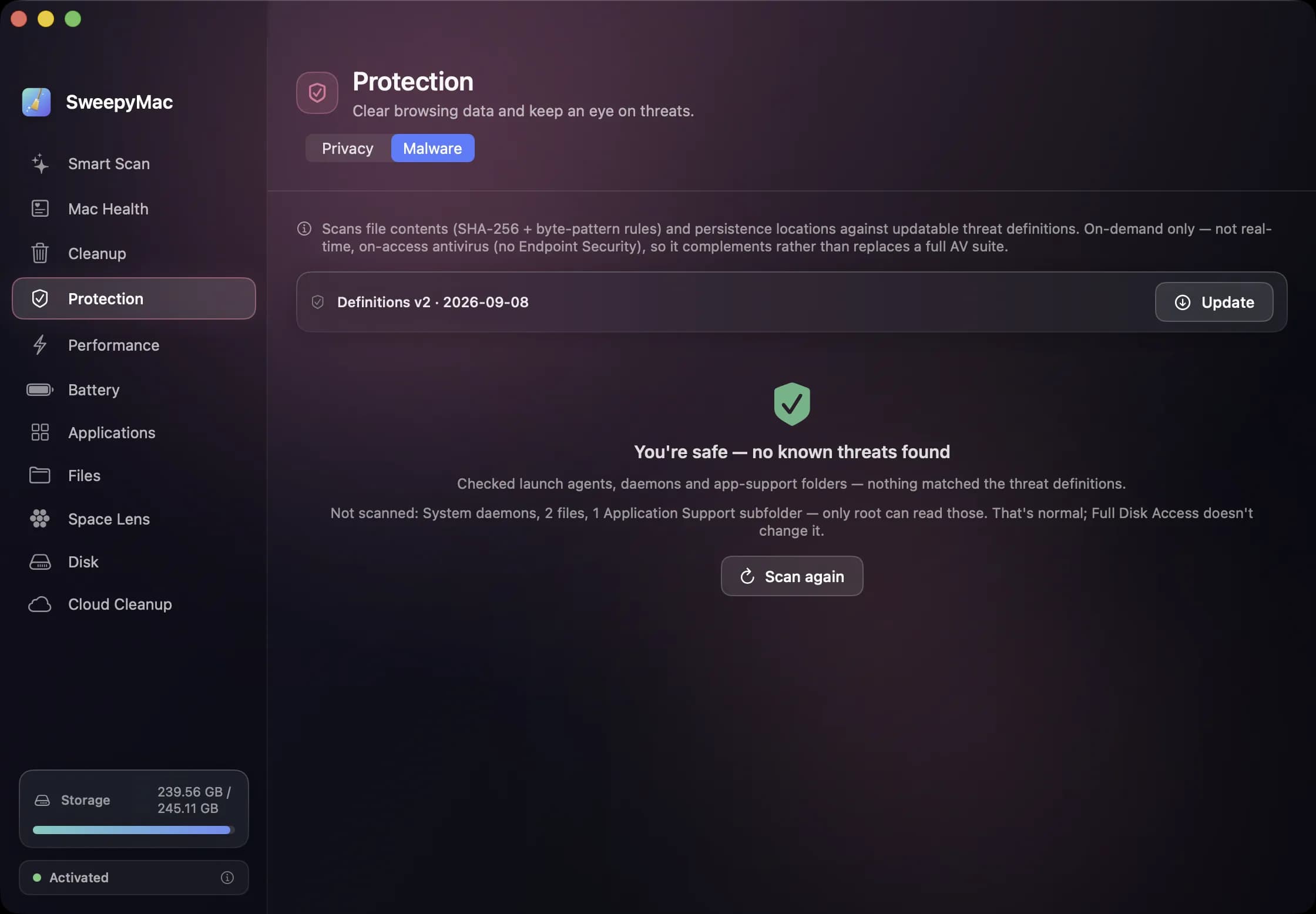
"We respect your privacy" appears on most software, and it has stopped meaning anything. So here is the specific version for the AppVerz apps. FocusLens contains no network code. It cannot make a request because there is nothing in it that knows how. SweepyMac makes one kind of request, to fetch and verify its malware definitions, plus a licence check that sends the key and nothing else. Neither app has an account, analytics, crash reporting or telemetry of any kind.
This post is about what that means day to day, what it costs us, and how you can check it rather than take our word.
What "no telemetry" removes
Telemetry is the quiet stream of events most apps send home: which screens you opened, which buttons you pressed, how long you stayed, what crashed. It is usually anonymised, and it is genuinely useful to the people building the app. It is also a record of your behaviour sitting on someone else's server, and the apps we make handle exactly the information that record would be most revealing about. FocusLens knows which apps you used all day and for how long. SweepyMac knows what is on your disk. Neither of those should ever leave the Mac they describe.
So we do not collect them, and we do not collect the lesser things either. No usage events. No crash reports. No "anonymous" installation ping. The only way we find out about a bug is that someone writes in, which is why the support address is read by the person who wrote the code.
What it costs us
Quite a lot, honestly. We do not know how many people use FocusLens. We do not know which SweepyMac module people open most, so design decisions are made from our own use and from the mail that arrives. When something crashes on a configuration we do not have, we learn about it only if the person who hit it is generous enough to send the report from Console. Products with telemetry get better faster in the places their users go. We have chosen to be slower in exchange for a claim we can make without qualification.
The one exception, in detail
SweepyMac's malware scanner needs definitions, and definitions go stale. So the app fetches a definitions file, and this is the single piece of network code it contains apart from the licence check. The fetch happens when you press Update on the Malware tab, and the app warns you when the definitions are more than thirty days old. The file is signed. The app checks the signature before trusting a byte of it, and a failed check keeps the previous definitions in place rather than installing the new ones. The request carries no information about your Mac beyond what any HTTP request carries.
Licensing is the other connection. When you enter a key, SweepyMac validates it, and it re-checks periodically. If the check cannot be made, the app keeps working for seven days, so a week away from the network does not lock you out. The check carries what is needed to validate the key and count this Mac against the licence, which is how a one-, two- or five-Mac plan is enforced. It does not send scan results, file names or anything about your disk.
How to check
You do not have to believe this. Put either app behind a network monitor such as Little Snitch or LuLu and watch what it asks for. FocusLens will ask for nothing, ever. SweepyMac will ask to reach the definitions server when you update and the licence server when it validates, and nothing else. Or do the simpler test: turn Wi-Fi off and use the app for a day. FocusLens is identical. SweepyMac is identical except that the Update button says it could not connect.
The privacy policies, one per app, say the same thing in a form that a lawyer would recognise. They are short because there is not much to say.
Why it matters more for these apps than most
A note-taking app that phones home is a mild concern. A cleaning tool that phones home has, at minimum, your file names. A focus tracker that phones home has a timeline of your working day. The apps we make are exactly the category where the data is most sensitive, so the bar has to be highest. "Nothing leaves your Mac" is not a marketing line we attached to the apps; it is the constraint we built them inside, and the reason FocusLens works from app-activation notifications instead of screen recording, and SweepyMac puts things in the Trash instead of a cloud backup. If you want the longer version of either, there is a post on how FocusLens tracks without permissions and one on what a cleaner should never do.
Questions people ask
- How does SweepyMac check a licence without a network connection?
- It does connect to validate a licence key when you enter one, and re-checks it from time to time. Between checks it keeps working for seven days offline. The check carries what is needed to validate the key and count this Mac against the licence, and nothing about your files or scans.
- How can I verify the no-network claim myself?
- Run the app with a network monitor such as Little Snitch or LuLu, or simply with Wi-Fi off. FocusLens behaves identically. SweepyMac behaves identically except that the definitions Update button reports it could not reach the server.
- Will you add analytics later?
- No. The apps are designed around not having them, and the privacy policies say so. If that ever changed, the policy would change first and the app would ask.
Related reading
- What SweepyMac's malware scanner actually checks, and what it is notLaunch agents by name, file contents by hash and byte pattern, code signatures, cron jobs and browser extensions. What each signal means, why a finding is labelled by how it was found, and why an on-demand scanner is a complement to macOS, not a replacement for it.
- Annual, monthly or once: choosing a SweepyMac plan, and moving a licence between MacsThree ways to pay, for one, two or five Macs, after a three-day trial with no account. What each plan costs, where the break-even points are, how a key activates and moves to a new Mac, and what the licence check sends.
- The orange triangle: what SweepyMac does when it cannot see somethingEvery scanner meets folders it cannot read. The dishonest ones leave them out and show you a clean total. SweepyMac marks incomplete lists, lists the locations it could not scan, skips health checks it cannot measure, and labels space a deletion would not actually free.
Have a question about any of this?
Write in. The person who built the apps reads every message and replies within two working days.