 AppVerz
Blog / 20 October 2026
How FocusLens tracks your day without asking for a single permission
No Screen Time API, no Accessibility access, no browser extension. FocusLens listens for the same app-activation notifications the Dock does, and that turns out to be enough to build a complete picture of where your attention went.
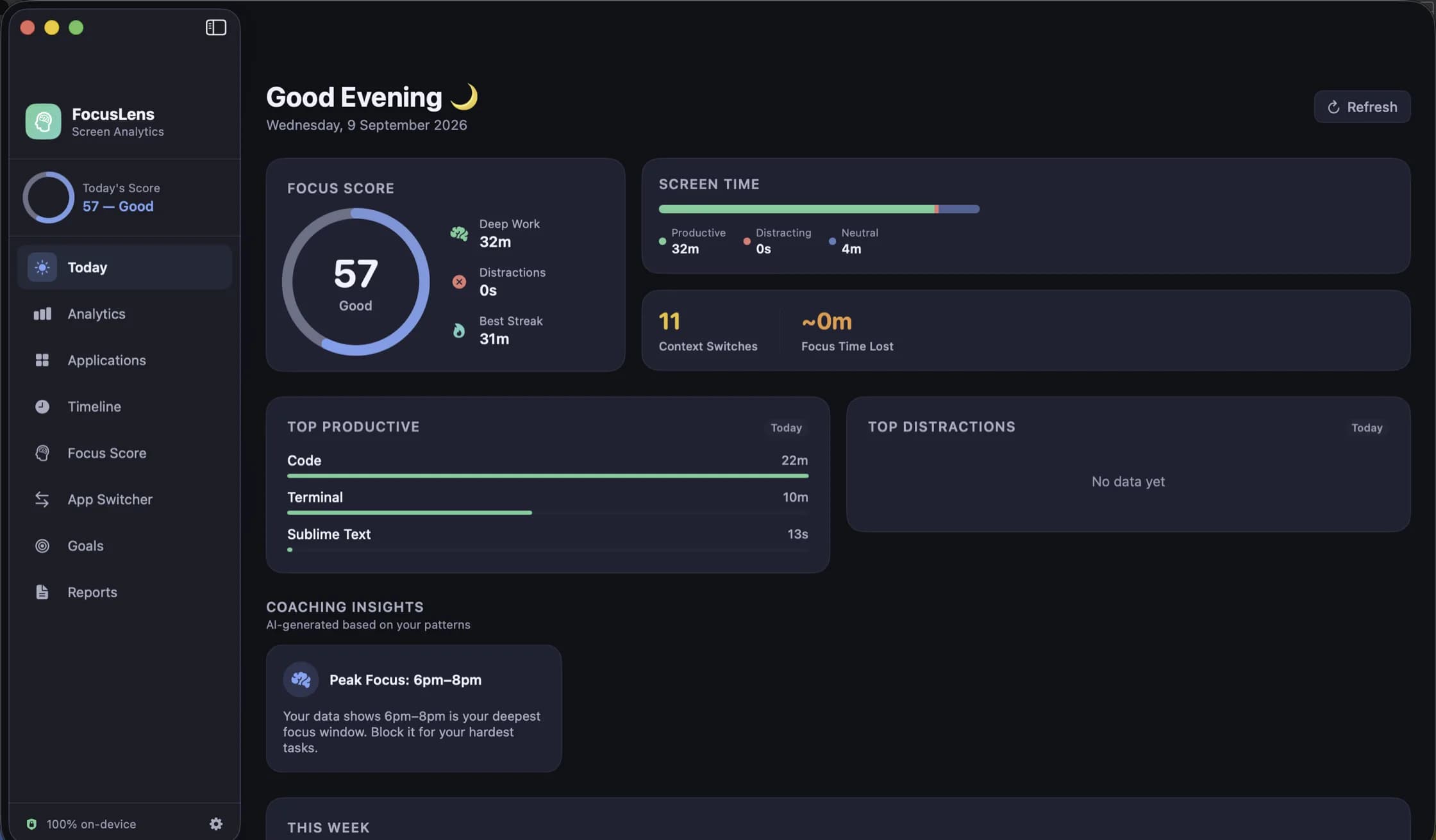
Time-tracking apps on the Mac tend to open with a permissions tour. Accessibility, so the app can read window titles. Screen Recording, so it can see what is on screen. A browser extension, so it knows which site you were on. Each one is a real grant of power, and each one is a reason people never install the app at all.
FocusLens asks for none of them. It can tell you how your day went, which apps broke your focus and what the switching cost you, using a signal macOS has always broadcast to every app that cares to listen.
The signal
When an app comes to the front on a Mac, the system posts a notification saying so. The Dock listens for it to bounce the right icon. The menu bar listens for it to swap in the right menus. Any app can listen for it; there is nothing to request and no switch in System Settings, because the notification carries no content. It says which app is now active and nothing more.
FocusLens listens for exactly that. Each time the front app changes, it notes the time. The gap between one notification and the next is how long you spent in the previous app. That is the entire tracking mechanism. There is no polling, no screen capture, no reading of window titles, and no idea what you were doing inside the app, only that you were in it.
What the signal can and cannot tell you
A log of app activations and durations is enough for almost everything a focus tool needs. It gives you time per app, time per category, the number of switches, the length of each unbroken stretch, and when in the day you were most settled. From those, FocusLens computes a daily score and the four components behind it: deep work, context switching, low distraction and your longest streak.
It cannot see inside an app. A browser is one app, so an hour in Safari counts as an hour in Safari, whether it was reading documentation or watching videos. We think that is the right trade for a tool that promises nothing leaves your Mac. If your browser is where your real work happens, you can override its category in Settings, and every past day recalculates around your answer.
The rules that make the signal honest
Raw activation data is noisy, so a few rules clean it up. Any stay shorter than five seconds is thrown away; flicking through apps with Command-Tab is not a session. Counting stops when the screen goes to sleep, so an evening away from the desk does not become nine hours in whatever was in front. And FocusLens never records itself: time spent looking at your own focus data does not count as focus.
Every switch between apps is recorded, but not every switch is treated the same. Leaving a productive app, or landing in a distracting one, is counted as a disruptive switch and priced at twenty-three minutes, the figure research on interruption gives for the time it takes to get fully back into a task. Switches between two neutral apps are logged but not priced. We wrote more about how that cost is counted and why we chose to show it.
What this means for your data
FocusLens makes no network requests. It has no account, no sign-in, no analytics and no server. Everything it records lives in its own storage on your Mac and goes when the app goes. The reports it produces, weekly, monthly or for a range you choose, can leave as a PDF or a CSV, but only when you export them.
There is a quieter benefit to the no-permission approach. An app with Accessibility access can be a liability if it is ever compromised, because that permission lets a process read and inject input across the whole system. FocusLens cannot be that kind of liability. It holds no permission that would be worth stealing.
Why we built it this way
The honest reason is that we did not want to install the alternatives on our own Macs. A tool whose job is to tell you something uncomfortable about your day should not also be a tool you have to trust with your screen. Building FocusLens on the activation signal alone was a constraint, and the constraint made the product. It asks for nothing, it watches nothing but which window is in front, and it still has plenty to say.
FocusLens is free and in limited preview while the release build is notarized. Ask for a build and it comes back by email.
Questions people ask
- Can FocusLens see what I type or what is on my screen?
- No. It has no Accessibility or Screen Recording permission and does not ask for either. It knows which app came to the front and when; it does not know what you did inside it.
- Does FocusLens track websites?
- No. A browser is one app, so an hour in Safari is an hour in Safari whether it was documentation or a video. There is no extension and no URL logging. If a browser is your main work tool, override its category in Settings to match how you use it.
- Where does the data go?
- Nowhere. FocusLens makes no network requests at all. Everything it records is stored on your Mac in the app's own storage and is removed when you remove the app.
Related reading
- Full Disk Access: what you are actually granting, and why SweepyMac asks onceThe macOS prompt everyone clicks through. What Full Disk Access unlocks, what it does not, how to check which apps have it, and why a scanner is one of the few tools that has a real case for it.
- Clearing browser data on a Mac: what a cleaner can touch, and why Safari is differentCache, history and cookies for every profile of every browser, listed one row at a time and nothing pre-selected. How SweepyMac's privacy cleaner works, why Safari only offers its cache, and why you must quit the browser first.
- Why our apps make no network requests, and the one exceptionFocusLens has no network code at all. SweepyMac has one connection, for a signed malware definitions file. Here is what no telemetry means in practice, what we give up for it, and how you can check the claim yourself.
Have a question about any of this?
Write in. The person who built the apps reads every message and replies within two working days.