 AppVerz
Blog / 22 October 2026
Clearing browser data on a Mac: what a cleaner can touch, and why Safari is different
Cache, history and cookies for every profile of every browser, listed one row at a time and nothing pre-selected. How SweepyMac's privacy cleaner works, why Safari only offers its cache, and why you must quit the browser first.
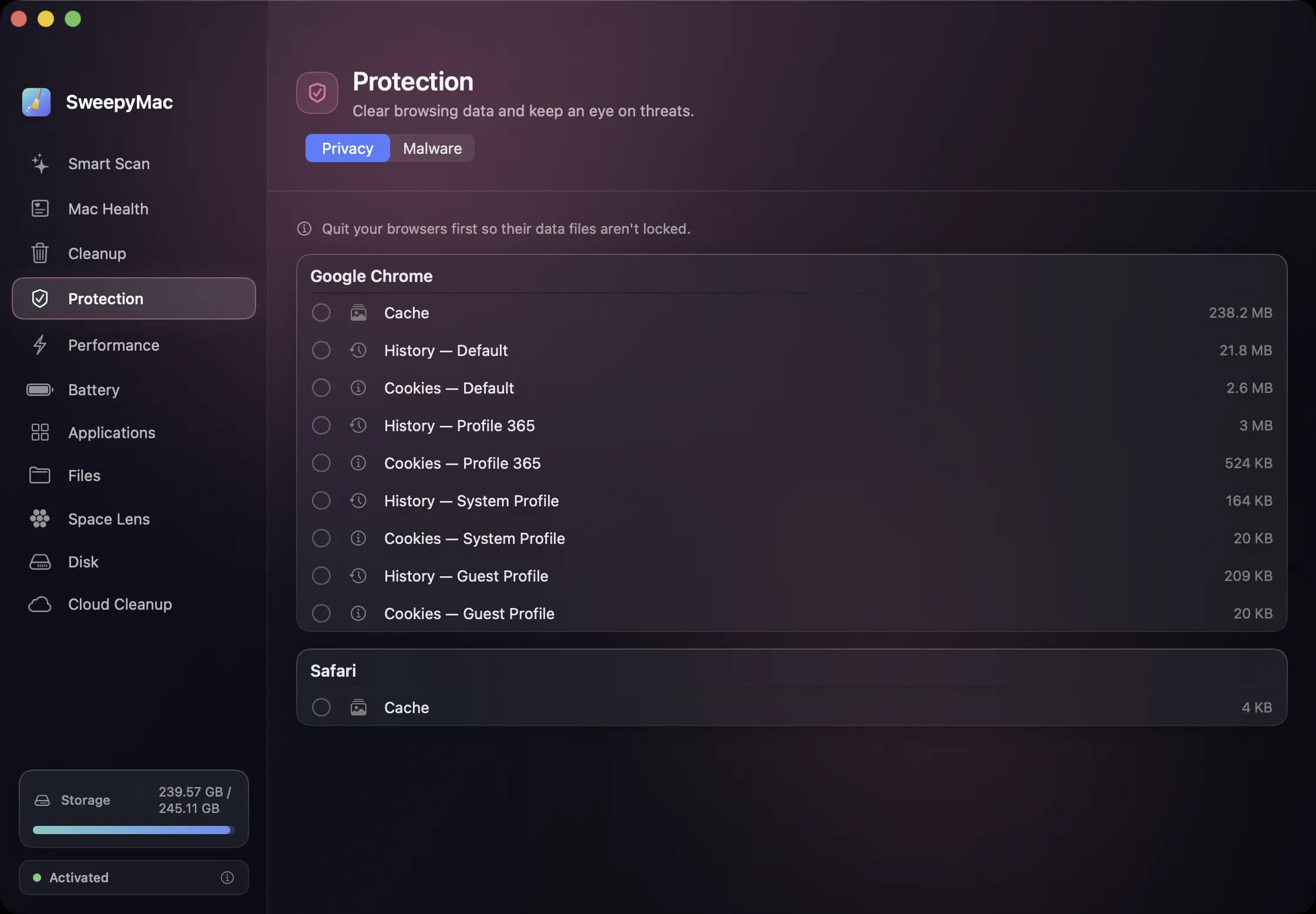
Browsers keep three kinds of data that people want gone for three different reasons. The cache, because it is large. History, because it is a record. Cookies, because they are how sites follow you. SweepyMac's privacy cleaner handles all three for every browser it finds, but the useful thing about it is less what it clears than how carefully it asks.
Which browsers
Google Chrome, Brave, Microsoft Edge, Arc, Vivaldi and Chromium, which all store their data the same way; Firefox, for the default profile; and Safari, with a caveat covered below. A browser with several profiles gets one row per profile per data type, so you see "History — Profile 1" and "History — Profile 2" rather than a single line that lumps them together. Only items that actually exist are listed; a browser you have never opened does not get an empty row.
Why nothing is ticked
The three data types have very different consequences. Clearing the cache costs you nothing but a slightly slower first load of each site. Clearing history removes the record of where you have been, which is often the whole point, but also removes the address bar's memory of the sites you visit daily. Clearing cookies signs you out everywhere, and for some sites forgets two-factor devices too. These are not the same decision, so SweepyMac makes none of them for you. Every row starts unticked. You tick what you mean and press Clear selected.
What you clear goes to the Trash like everything else in the app, so a cleared history file can be put back. That is not something browsers offer themselves.
Quit the browser first
A running browser holds its data files open, and a file that is open cannot be moved. If you scan with Chrome running, the rows appear but clearing them fails, and the app says so: "N items couldn't be cleared. Quit the browser if it's still open." Quit means quit, from the menu or with Command-Q, not closing the window; most browsers keep running in the Dock with no windows. Then scan again.
The Safari exception
Safari is different because Apple treats its history and cookies as private to Safari. They live in locations that macOS fences off from every other app, and Full Disk Access does not open them. So SweepyMac offers Safari's cache, which is readable, and nothing else. For history and cookies, Safari's own Clear History command in its menu is the right tool, and it works well.
We mention this because other cleaners sometimes imply they clear everything for Safari. If a tool claims to clear Safari's cookies from outside Safari, either it is not doing what it says or it is doing something it should not.
What "privacy" means here
This is a local cleaner. It removes data stored on your Mac by your browsers. It does not block trackers, change your DNS, or route anything anywhere; those are different problems with different tools. What it does do is make the periodic cleanout, the thing people mean to do and never get round to, into a two-minute task with a list you can read.
It also keeps the app's own rule. SweepyMac has no account and no telemetry, so the list of what it found in your browser stays on your Mac. A privacy cleaner that reported what it cleaned to a server would be a contradiction in terms.
A sensible routine
Cache whenever you like; it is just space. History when you want a clean slate, bearing in mind the address bar will forget your shortcuts. Cookies rarely, and deliberately, with a password manager open, because the next hour is sign-ins. For a shared or borrowed Mac, all three before handing it back. The Privacy tab is one of two in Protection; the other is the on-demand malware scanner, which we cover in what the malware scanner actually checks.
Questions people ask
- Why can SweepyMac only clear Safari's cache?
- Because macOS protects Safari's history and cookies from other apps, and no amount of permission changes that. The cache is readable, so that is what is offered. Safari's own Clear History command handles the rest.
- Will clearing cookies sign me out of websites?
- Yes. A cookie is how a site remembers you are signed in, so clearing them means signing in again. That is why cookies are a separate row from cache and history, and why nothing is ticked for you.
- What does it mean that some items could not be cleared?
- The browser was still running and had its files locked. Quit it completely, including from the Dock, and scan again.
Related reading
- Full Disk Access: what you are actually granting, and why SweepyMac asks onceThe macOS prompt everyone clicks through. What Full Disk Access unlocks, what it does not, how to check which apps have it, and why a scanner is one of the few tools that has a real case for it.
- The orange triangle: what SweepyMac does when it cannot see somethingEvery scanner meets folders it cannot read. The dishonest ones leave them out and show you a clean total. SweepyMac marks incomplete lists, lists the locations it could not scan, skips health checks it cannot measure, and labels space a deletion would not actually free.
- The Mac Health score, explained: every number, every thresholdSweepyMac sums up your Mac as one score out of 100. This is what goes into it, exactly when each recommendation fires, and why a check that cannot read its data is skipped rather than marked fine.
Have a question about any of this?
Write in. The person who built the apps reads every message and replies within two working days.