 AppVerz
Blog / 15 October 2026
The twenty-three minute cost of a context switch, and how FocusLens counts it
Switching apps is free. Getting your head back into the work you left is not. FocusLens prices the disruptive switches at the figure interruption research gives, names the apps responsible, and groups the rapid-fire bursts so you can see them.
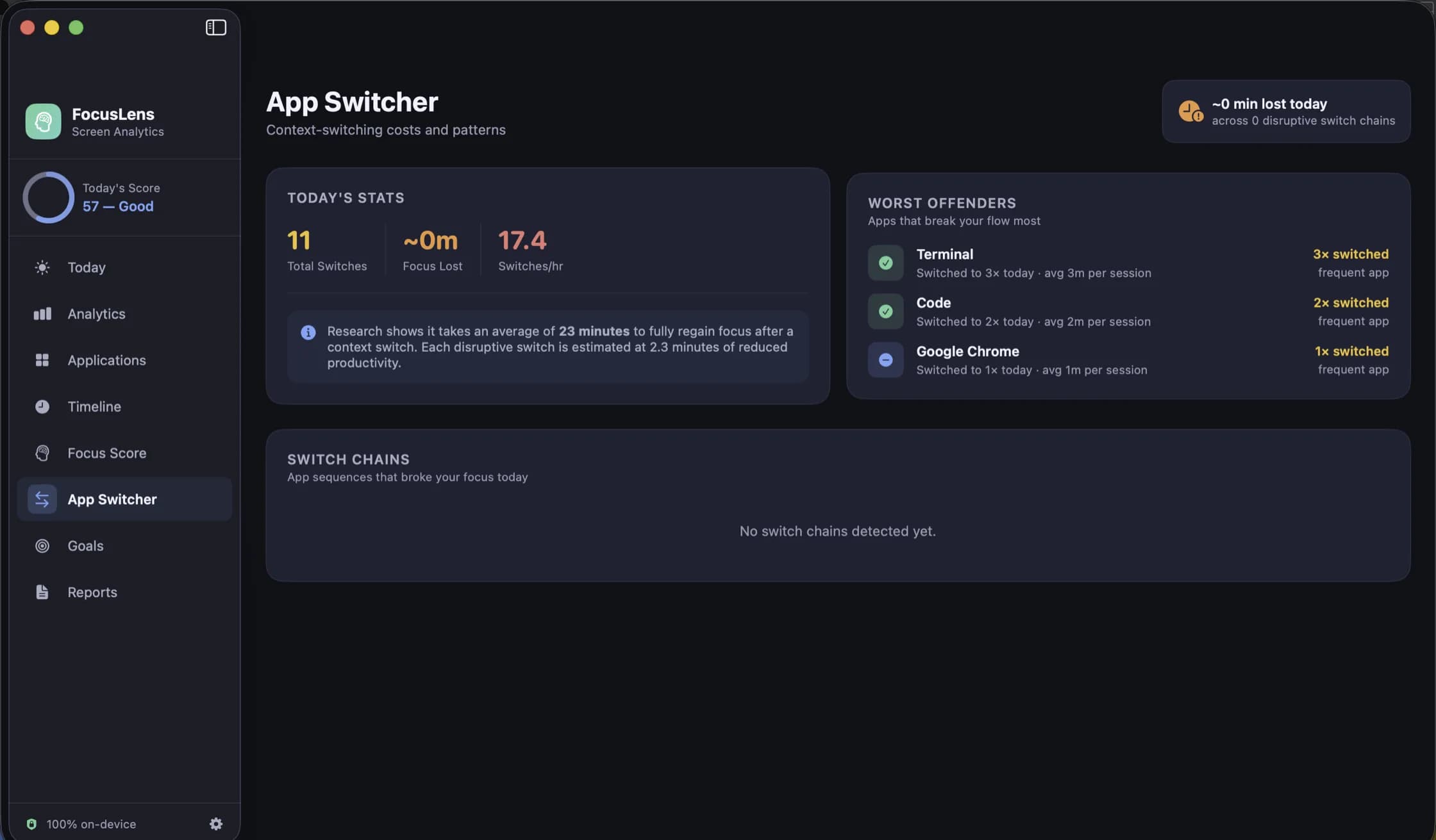
A context switch costs nothing in the moment. Command-Tab, glance, Command-Tab back. The cost shows up later, in the minute or two it takes to remember where you were, and in the quality of the next half hour. FocusLens tries to make that cost visible, and this post explains how it does the arithmetic and why we chose the number it uses.
Where twenty-three minutes comes from
The figure comes from research on workplace interruption, most often cited from Gloria Mark's studies at the University of California, Irvine, which found that after an interruption it took people around twenty-three minutes to return fully to the original task. The number is an average over knowledge workers doing ordinary office work, not a law of nature, and in any individual case the real cost is higher or lower. We use it because it is the best-known measured figure, and because a defensible estimate is more useful than no estimate at all.
FocusLens shows it as focus time lost: the number of disruptive switches in a day multiplied by twenty-three minutes. On a bad day that figure can exceed the hours you were at the desk, which sounds absurd until you remember that recovery periods overlap. The point of the number is not precision. It is to turn "I switched a lot today" into a quantity you can compare with yesterday.
Which switches count
Not every change of app is a disruption. Moving from your editor to the terminal and back is the work. So FocusLens counts every switch but prices only the disruptive ones, and a switch is disruptive if it does one of two things: it leaves a productive app, or it lands in a distracting one. Leaving a productive app for another productive app is counted but not priced. Hopping between two neutral utilities is logged and ignored.
The app's category decides which case you are in. Apps land in productive, communication, distracting, entertainment, utilities or neutral by default, and the default classifier will be wrong about at least one of them for you. Slack is communication for most people and the whole job for a community manager. When it is wrong, override the category in Settings and every past day is recomputed around your answer, including the switch costs.
Naming the offenders
A total is a mood; a list is something you can act on. The App Switcher view ranks the apps that broke your focus most often, so you can see that it was the mail client eleven times and the chat app nine, not "distractions" in general. Switch chains are grouped as well: a burst of six switches inside a minute is shown as one burst, because that pattern, checking everything at once, is a different habit from a single interruption and usually has a different fix.
How the switching feeds the score
FocusLens's daily score is one number out of 100, made of four parts with their own ceilings: deep work out of 30, context switching out of 25, low distraction out of 25 and your longest focus streak out of 20. The context switching component is where this arithmetic lands. A day with few disruptive switches scores the full 25; a day of constant interruption scores close to zero on that part while the others stand on their own.
Because the parts are shown separately, a bad score tells you which part went wrong. The screenshot on the FocusLens page shows a day scoring 57 with context switching and low distraction both at full marks: the problem that day was not interruption, it was that only two of a possible thirty deep-work points were earned. That is a different problem with a different fix, and a single number would have hidden it.
What to do with the number
The most useful thing is to look at it for a week before changing anything. A baseline tells you whether Tuesday's forty switches is normal for you or an outlier, and the Analytics view's hour-by-hour heatmap will usually show a window in the day where switching is low and work gets done. Protecting that window is worth more than any amount of willpower in the others.
Then pick one offender. The Worst Offenders list usually has a clear leader, and the fix is almost always structural: notifications off for that app, or a fixed time to open it, rather than a resolution to be stronger. Set a goal against the category in FocusLens if it helps, and the progress bar fills from the hours you actually logged rather than from a number you typed once.
FocusLens is free, does all of this on your Mac without an account or a network connection, and is available in preview by email while the release build is notarized.
Related reading
- Categories you can argue with: how FocusLens files your apps, and how to overrule itProductive, communication, distracting, entertainment, utilities, neutral. FocusLens sorts every app into one of six categories by default, and the default will be wrong about somebody's job. Here is what each category does to your numbers, and how one override rewrites your whole history.
- Goals that read from real usage: targets and limits in FocusLensA goal you type once and then track by memory is a wish. FocusLens fills every goal's progress bar from the hours you actually logged: a daily target for the work you want more of, a limit for the time you want less of.
- Looking back: the timeline, the heatmap and reports you can take out of FocusLensA per-session log for any day, one app at a time with its busiest day and typical session, a week drawn hour by hour, and weekly or monthly reports you can export as PDF or CSV. The four ways FocusLens lets you look back, and what each one is for.
Have a question about any of this?
Write in. The person who built the apps reads every message and replies within two working days.