 AppVerz
Blog / 4 November 2026
Goals that read from real usage: targets and limits in FocusLens
A goal you type once and then track by memory is a wish. FocusLens fills every goal's progress bar from the hours you actually logged: a daily target for the work you want more of, a limit for the time you want less of.
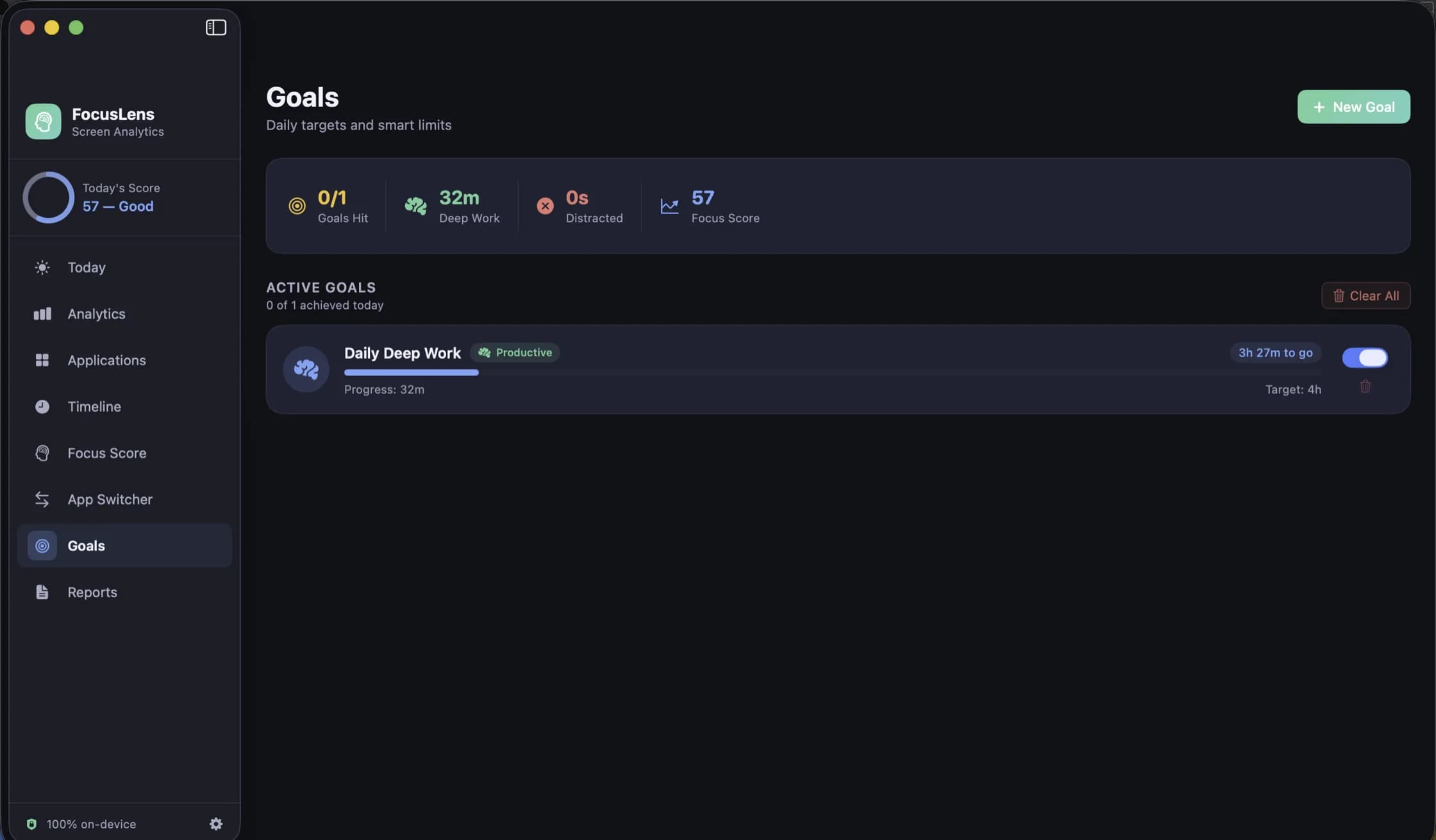
Most goal-setting for focus happens in your head. You decide this week will be different, you aim for four solid hours a day, and by Wednesday you have no idea whether you managed it on Monday. The goal was real; the measurement was not.
FocusLens already knows how long you spent in each category, because that is what it records all day. Goals simply point that data at a number you care about.
Targets and limits
A goal in FocusLens is one of two kinds, set against a category:
- A daily target: an amount you want to reach. Four hours of deep work, say.
- A daily limit: an amount you want to stay under. An hour in distracting apps, ninety minutes in communication.
Targets are for the work you want more of. Limits are for the time you want less of. Most people end up with one of each, which turns out to be a good balance: one goal pulling you towards something, one fencing something off.
Progress from the hours you logged
The important design decision is where the progress bar gets its number. It reads from the hours FocusLens has actually recorded in that category today, live, as the day goes on. You do not log anything or tick anything off. A goal card shows the target and your live progress towards it, and it moves while you work.
That is the difference between a goal and a wish. The number cannot drift, cannot be rounded up at the end of a long day, and cannot rot. A goal you set two months ago is measured as honestly today as on the day you set it.
Goals depend on your categories
Because goals are set against categories, they are only as accurate as the categories are. A deep work target fills from whatever FocusLens counts as productive. If your main writing tool is filed as a utility, your target will look impossible and the problem is not your discipline.
Fix the filing first. The post on categories covers how overrides work; the short version is that an override in Settings recalculates every past day, goals included.
Managing goals
Goals are easy to change, which matters more than it sounds. A goal that no longer fits a season of your work is worse than no goal, because it trains you to ignore the screen. Each goal can be:
- Paused, when you are on holiday, ill, or doing a week of work that does not fit the target.
- Deleted, when it no longer reflects what you want.
- Set to notify you when it is met.
Notifications are composed and scheduled on your Mac. If you turn them on, macOS asks for permission once; refuse it and goals still work, you just do not get the alert.
The summary strip
Above the goal cards, the Goals screen opens with a summary strip: goals hit, deep work, distracted time and focus score. It is the four numbers you would want if you only had a second to look, and it connects goals to the rest of the app. A day where you hit your deep work target but your focus score is low usually means the hours were there but fragmented, which is a different problem from not having the hours at all.
Setting a goal you will keep
Some suggestions from using it ourselves:
Measure before you set. Use FocusLens for a week without goals. Your Reports and Analytics will show what a normal day looks like, and a target set ten percent above your real average is one you will hit and build on. A target set at the number you wish were true is one you will pause by Thursday.
Start with one target and one limit. More than that and the Goals screen becomes a list of small failures.
Make limits about the biggest leak. The App Switcher view names the apps that break your focus most often. If one category dominates that list, that is your limit.
Revisit after a month. If you hit a target every day, raise it or retire it. A goal you always meet has stopped telling you anything.
What is coming
Per-app goals, so you can set a limit on one particular app rather than its whole category, are on the list of planned features after the notarized release, along with a longer history in the heatmap and an iPhone companion that reads the same numbers.
FocusLens is free, keeps all of this on your Mac and makes no network requests at all. It is available as a preview by email while the release build is notarized.
Questions people ask
- What is the difference between a target and a limit?
- A target is something you want to reach, such as four hours of deep work a day. A limit is something you want to stay under, such as an hour in distracting apps. Both are set against a category and both fill from your tracked time.
- Can I set a goal for one specific app?
- Not yet. Goals are set against categories today. Per-app goals are on the list of planned features.
- Do I need to allow notifications to use goals?
- No. Goals work without them. Notifications only add an alert when a goal is met, and macOS asks for the permission the first time you turn alerts on.
Related reading
- Categories you can argue with: how FocusLens files your apps, and how to overrule itProductive, communication, distracting, entertainment, utilities, neutral. FocusLens sorts every app into one of six categories by default, and the default will be wrong about somebody's job. Here is what each category does to your numbers, and how one override rewrites your whole history.
- Looking back: the timeline, the heatmap and reports you can take out of FocusLensA per-session log for any day, one app at a time with its busiest day and typical session, a week drawn hour by hour, and weekly or monthly reports you can export as PDF or CSV. The four ways FocusLens lets you look back, and what each one is for.
- The FocusLens focus score, taken apart: four parts, four ceilingsOne number out of 100 is easy to read and easy to misread. FocusLens builds its focus score from deep work, context switching, low distraction and your longest streak, and shows each part on its own bar so a bad day tells you what went wrong.
Have a question about any of this?
Write in. The person who built the apps reads every message and replies within two working days.