 AppVerz
Blog / 4 November 2026
The FocusLens focus score, taken apart: four parts, four ceilings
One number out of 100 is easy to read and easy to misread. FocusLens builds its focus score from deep work, context switching, low distraction and your longest streak, and shows each part on its own bar so a bad day tells you what went wrong.
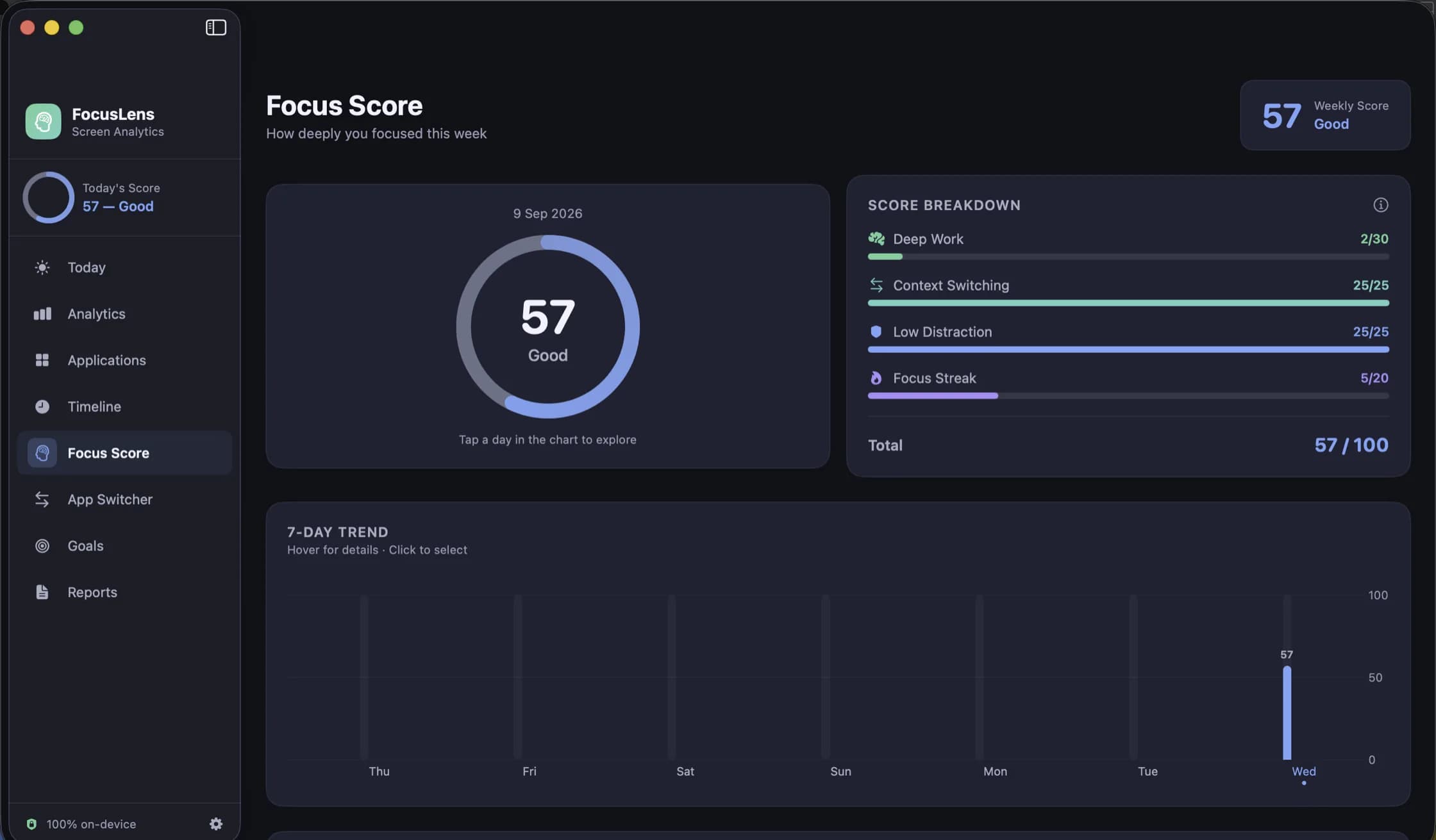
A single number for a day of work is a strange idea when you look at it directly. Days are not alike, work is not alike, and any score that pretends otherwise will be wrong for someone. We built one into FocusLens anyway, because a number you can compare across a week is genuinely useful, and then we did the thing that makes a score defensible: we made it something you can take apart.
Four parts, each with a ceiling
FocusLens's focus score is out of 100, and it is the sum of four components, each with its own maximum:
| Component | Ceiling | What it rewards |
|---|---|---|
| Deep work | 30 | Productive hours, counted up to eight |
| Context switching | 25 | Few disruptive jumps between apps |
| Low distraction | 25 | A high share of time not spent in distracting apps |
| Focus streak | 20 | Your longest unbroken run of focused work |
The Focus Score page shows each one as its own bar against its own ceiling, beside a ring with the day's total and a seven-day trend underneath. That page is the point of the design. The ring is for glancing at; the breakdown is for understanding.
Deep work: the biggest slice
Deep work is the largest component, at 30 points, and it counts productive hours up to eight. Past eight it stops rewarding you. That cap is deliberate: a score that kept climbing with hours would quietly reward the twelve-hour day, and we did not want the app to cheer for that.
What counts as productive depends on the app's category, which is why the category overrides matter. If FocusLens has filed your main tool in the wrong place, this is the component that suffers.
Context switching: the subtraction
Context switching works the other way round from the rest. A day with few disruptive jumps between apps keeps the full 25, and each disruptive switch takes something away. A switch is disruptive when it leaves productive work or lands in a distracting app; moving from your editor to the terminal and back is the work, and it is counted but not penalised. The arithmetic behind this, and the twenty-three minute figure FocusLens uses to price a disruption, is in its own post.
Low distraction: the share, not the total
Low distraction is the share of your tracked time that was not spent in distracting apps. It is a proportion rather than a count of minutes, so a short day and a long day are judged on the same footing. Half an hour of distraction in a two-hour session is a different day from half an hour across eight hours, and the score treats them differently.
Focus streak: the longest run
The streak component, worth 20, rewards your longest unbroken run of focused work in the day. It is the part that separates a fragmented day from a concentrated one. Four hours of productive time in three long sittings and four hours in twenty ten-minute pieces earn similar deep work points; they do not earn similar streaks.
Reading a real day
The screenshot on the FocusLens page shows a day scoring 57, and it is a good example of why the breakdown exists. Context switching scored the full 25. Low distraction scored the full 25. The streak scored 5 of 20. Deep work scored 2 of 30.
A single number would have said "mediocre day". The breakdown says something more precise: there was no interruption problem and no distraction problem. The problem was that very little time went into productive apps at all, and none of it in a long run. That might mean a day of meetings, a day of reading in a neutral app, or a misfiled category. Each of those has a different fix, and the score points you at the right question.
Taking it with a pinch of salt
FocusLens knows which app was in front of you and for how long. It does not know what you did inside it. It cannot tell reading documentation in a browser from reading the news in one, unless you tell it how to file the browser. It times the app in front of you rather than you, so it stops counting when the display or the Mac sleeps, and short flicks under five seconds are never recorded at all.
That is why the score is a tool for comparing your days with each other, not for comparing yourself with anyone else. Read it for a week before changing anything; the trend chart under the ring is there for exactly that. Then pick the component that is consistently lowest and work on that one.
Where else the score shows up
The score appears on the Today dashboard as a ring, with a coaching insight underneath that names things like your peak focus window. It runs through the score history in Reports. And if you turn on notifications, FocusLens can send score and goal alerts, composed and scheduled on your Mac. A widget reads today's summary from a container shared with the app, so you can keep the score on your desktop without opening anything.
FocusLens is free, makes no network requests and asks for no permission to track. It is available as a preview by email while the release build is notarized.
Questions people ask
- Why is my focus score low when I worked all day?
- Open the Focus Score page and read the breakdown. A day of real work chopped into ten-minute pieces scores lower than the same hours in three sittings, because the streak and context switching parts reward unbroken time. The breakdown shows which part fell short.
- Does the score count time I spent away from the Mac?
- FocusLens stops counting when the display sleeps and when the Mac sleeps. Between those it times the app in front of you, not you, so locking the screen when you walk away keeps the numbers honest.
- Can I change which apps count as productive?
- Yes. Override an app's category in Settings and every past day, including its score, recalculates around your answer.
Related reading
- Categories you can argue with: how FocusLens files your apps, and how to overrule itProductive, communication, distracting, entertainment, utilities, neutral. FocusLens sorts every app into one of six categories by default, and the default will be wrong about somebody's job. Here is what each category does to your numbers, and how one override rewrites your whole history.
- Goals that read from real usage: targets and limits in FocusLensA goal you type once and then track by memory is a wish. FocusLens fills every goal's progress bar from the hours you actually logged: a daily target for the work you want more of, a limit for the time you want less of.
- Looking back: the timeline, the heatmap and reports you can take out of FocusLensA per-session log for any day, one app at a time with its busiest day and typical session, a week drawn hour by hour, and weekly or monthly reports you can export as PDF or CSV. The four ways FocusLens lets you look back, and what each one is for.
Have a question about any of this?
Write in. The person who built the apps reads every message and replies within two working days.