 AppVerz
Blog / 4 November 2026
Categories you can argue with: how FocusLens files your apps, and how to overrule it
Productive, communication, distracting, entertainment, utilities, neutral. FocusLens sorts every app into one of six categories by default, and the default will be wrong about somebody's job. Here is what each category does to your numbers, and how one override rewrites your whole history.
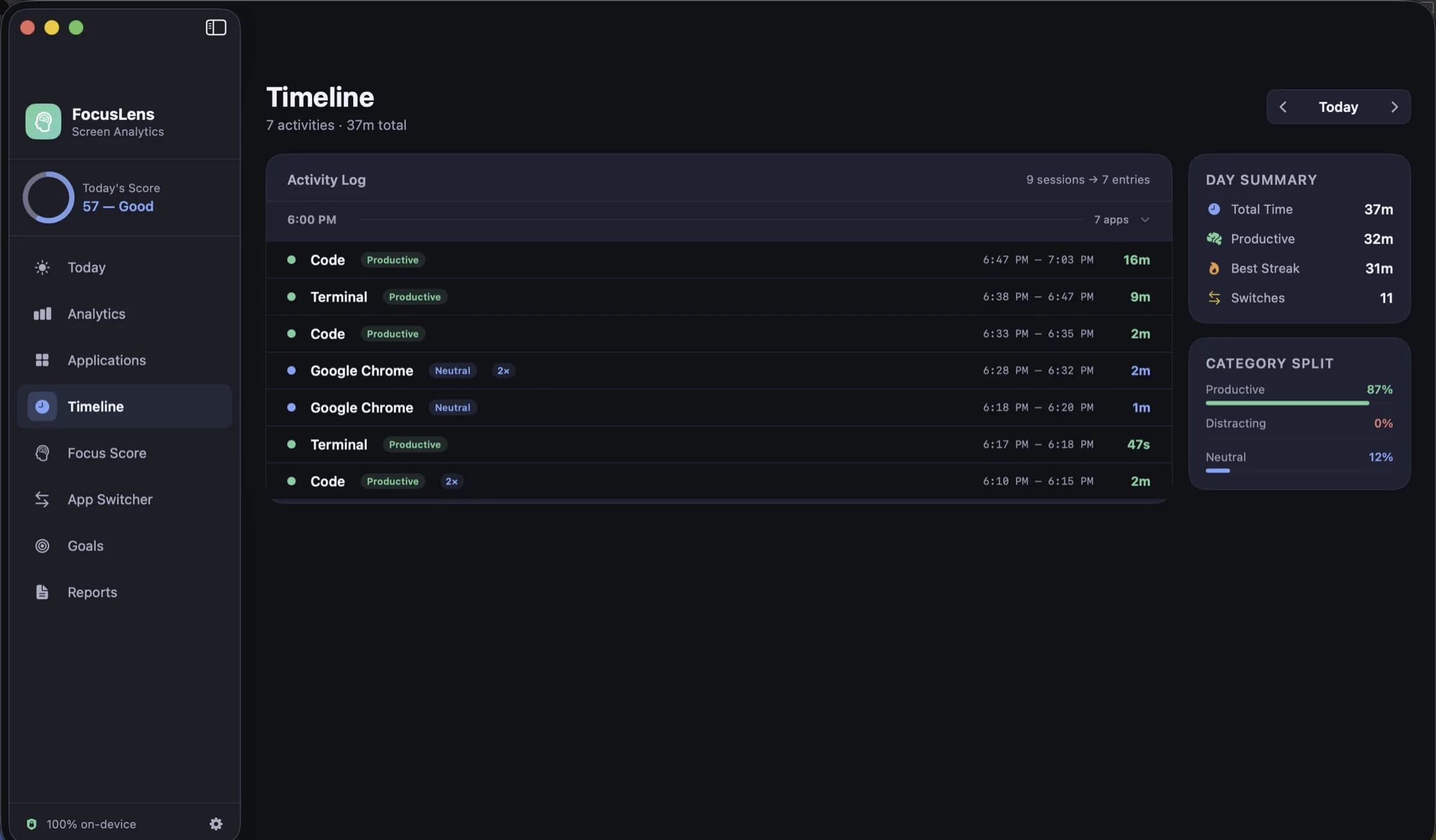
Every time tracker has to decide, for every app on your Mac, whether time in it was good or bad. It is the least glamorous part of the product and the one that determines whether the numbers mean anything. FocusLens makes that decision with a built-in classifier, shows you the result everywhere, and then hands the final say to you. This post is about that hand-over.
The six categories
Every app FocusLens sees lands in one of six categories by default:
- Productive: the tools the work is done in. Editors, design tools, spreadsheets, terminals.
- Communication: mail, chat and the other ways people reach you.
- Distracting: the apps that pull attention away from the work.
- Entertainment: video, music, games.
- Utilities: the small tools that support the work without being it.
- Neutral: everything that should simply not count either way.
What FocusLens records for each stretch of time is small: the app's name, its bundle identifier, the category it was counted as, and when the session started and ended. The category is the one piece of judgement in that row, and almost every number in the app is built on it.
What a category actually changes
It helps to be specific about what moves when an app changes category, because the effect is larger than it looks.
The focus score. Deep work, the largest part of the focus score, counts productive hours. Low distraction is the share of time not spent in distracting apps. Move your main tool from neutral to productive and both of those change for every day you used it.
Context switch costs. FocusLens prices a switch as disruptive when it leaves a productive app or lands in a distracting one. Whether a jump to your chat app costs you twenty-three minutes or nothing depends entirely on how chat and the app you left are filed.
The category split. The Today screen's screen-time bar, the Timeline's category split, the Analytics donut chart and the Reports all divide your time by category.
Goals. A goal is set against a category, so a "four hours of deep work" target fills from whatever you have filed as productive.
Why the default will be wrong for you
The built-in classifier is a reasonable starting point and, by definition, wrong about somebody's workflow. A few examples we hear about:
- Slack is communication for most people and the whole job for a community manager.
- A browser is distracting for a novelist and productive for a web developer who lives in its developer tools.
- YouTube is entertainment, unless you edit video for a living, in which case it is where the work gets checked.
- A notes app is a utility for one person and the main writing tool for another.
FocusLens cannot tell these cases apart, and we would rather it did not try. It does not read window titles, URLs or document names, so it has no way to know that this particular browser session was work. A classifier that guessed from more data would need more of your data. One that asks you, once, needs none.
Overriding a category
Overriding is in Settings. Search for the app, choose the category you think it belongs in, and that is it. There is no per-day or per-session tagging to maintain, and no rule language to learn.
The important part is what happens next: every past day recalculates around your answer. Not just today, and not just from now on. Scores, switch costs, category splits and goal progress for every day FocusLens has recorded are recomputed with the app in its new category. If you have been using FocusLens for a month with your main tool misfiled, the month is not wasted; fix the category and the month is correct.
That design choice comes from how people actually use a tracker. Nobody sets the categories carefully on day one. You notice, two weeks in, that a day you know was productive scored badly, you open the breakdown, and you see why. An override that only applied going forward would leave you with two weeks of numbers you know are wrong.
Seeing categories in the data
The Timeline is the best place to check whether the categories match reality. Pick a day and it lists every session in order, with the app, a category badge, the start and end times and the duration, and a day summary and category split beside the list. Scrolling a day you remember is the fastest way to spot a misfile: the two-hour block you spent writing, badged as neutral.
The Applications view turns the same data around, one app at a time, and is covered with the other ways of looking back in the post on reports.
A suggested first week
- Use your Mac normally for a few days without changing anything.
- Open the Timeline for a day you remember well and look for sessions whose category badge surprises you.
- Override those apps in Settings. Usually it is two or three.
- Look at the Focus Score page for the same day and check that the breakdown now matches how the day felt.
After that the categories rarely need touching, and the numbers are yours rather than the classifier's.
FocusLens is free, keeps everything on your Mac and makes no network requests. It is available as a preview by email while the release build is notarized.
Questions people ask
- FocusLens put an app in the wrong category. How do I fix it?
- Open Settings and use the category override list: search for the app, choose the category you think it belongs in, and every past day recalculates around your answer.
- Does an override only apply from today onwards?
- No. It applies to every day FocusLens has recorded. Scores, switch costs, category splits and goal progress are all recomputed with the app in its new category.
- Can FocusLens tell which website I was on?
- No. It records the app, not what was inside it: no URLs, page titles, window titles or document names. A browser is filed as one app, in one category.
Related reading
- Goals that read from real usage: targets and limits in FocusLensA goal you type once and then track by memory is a wish. FocusLens fills every goal's progress bar from the hours you actually logged: a daily target for the work you want more of, a limit for the time you want less of.
- Looking back: the timeline, the heatmap and reports you can take out of FocusLensA per-session log for any day, one app at a time with its busiest day and typical session, a week drawn hour by hour, and weekly or monthly reports you can export as PDF or CSV. The four ways FocusLens lets you look back, and what each one is for.
- The FocusLens focus score, taken apart: four parts, four ceilingsOne number out of 100 is easy to read and easy to misread. FocusLens builds its focus score from deep work, context switching, low distraction and your longest streak, and shows each part on its own bar so a bad day tells you what went wrong.
Have a question about any of this?
Write in. The person who built the apps reads every message and replies within two working days.