 AppVerz
Blog / 1 November 2026
What a Mac cleaner should never do
Most cleaning apps ask you to trust them. SweepyMac is built so you do not have to: everything it removes goes to the Trash, every clean has an Undo, and every group opens up before you press anything.
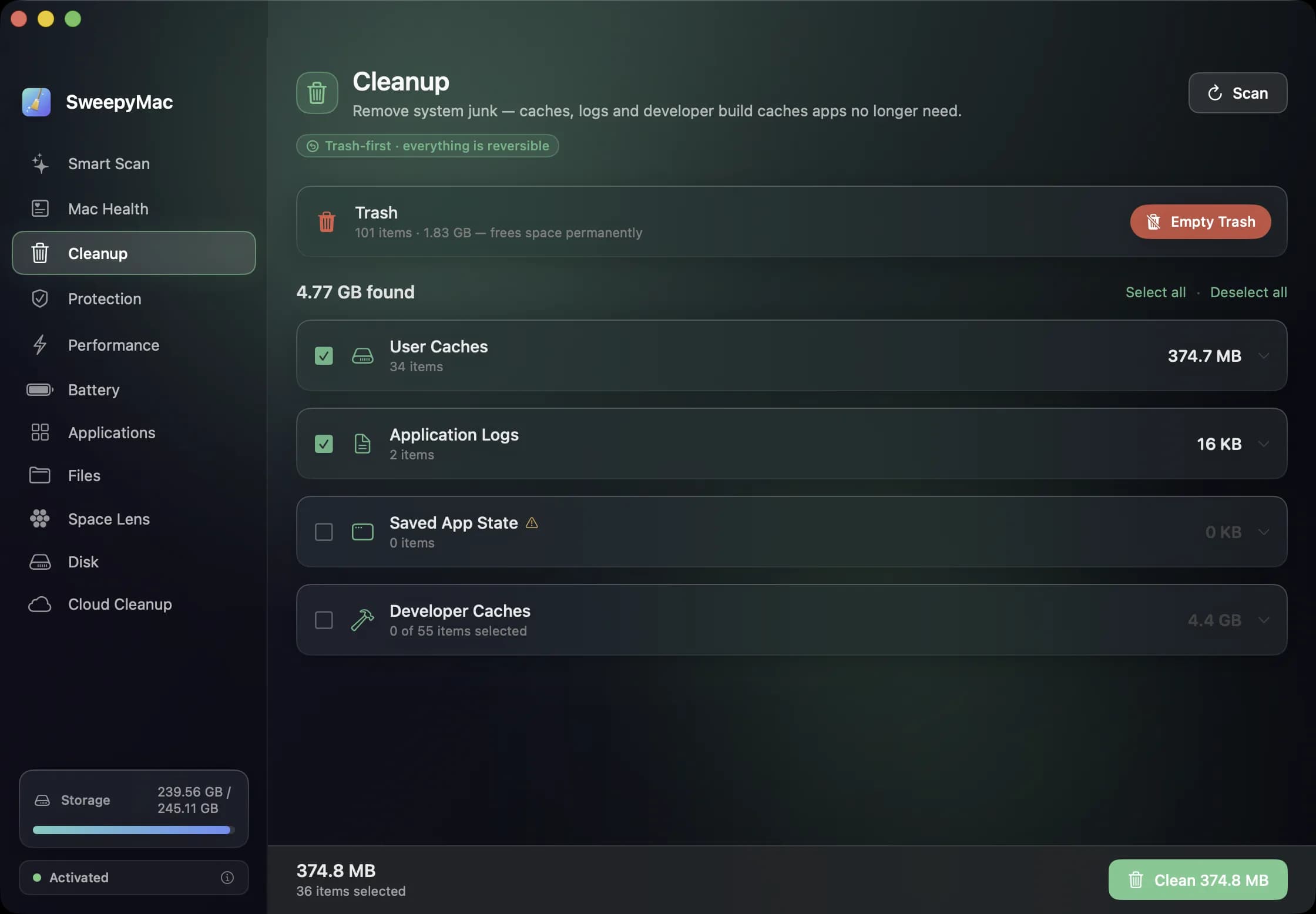
Every Mac cleaner makes the same promise: press the big button and get gigabytes back. The question that matters is what happens if it was wrong about one of those gigabytes. We built SweepyMac around that question, and the answer shaped most of the app. Here is the list of things we decided a cleaner must never do, and what SweepyMac does instead.
Never delete. Move to the Trash.
The Trash exists for exactly this. A file in the Trash costs you nothing until you empty it, and it is one drag away from being back where it was. So SweepyMac does not hard-delete anything it finds. Caches, logs, saved application state, duplicate files, an app and its leftovers, a browser's cookies: all of it goes to the Trash, and the message that appears after a clean reads "Freed X" with an Undo button beside it.
There are two exceptions, and the app treats them as exceptions. Emptying the Trash itself is permanent by definition, so that is a separate button with its own confirmation. Removing a threat that lives in a system-owned location needs an administrator password, deletes the file for good, and asks you first in plain words. Everything else is reversible.
Never clean something the user has not seen
A total is not information. "3.97 GB of junk" tells you nothing about whether the 3.97 GB includes the cache your photo editor spent an hour building. So every group in Cleanup opens up. Click User Caches and you get the folders inside it, with sizes, and the reason that category is considered safe. You can untick one folder and keep the rest.
The categories that arrive pre-selected are the conservative ones: user caches, application logs and saved app state. Developer caches, which cover Xcode's DerivedData along with npm, Gradle and Cargo, are listed but start unticked, because for a developer those caches are a Monday morning rebuild waiting to happen. App Leftovers, the support files of apps you no longer have installed and have not touched for sixty days, start unticked for the same reason: you might be about to reinstall.
Some things are never offered at all. Xcode Archives, iOS DeviceSupport folders, Docker images and Apple's own items do not appear in Cleanup, because the cost of getting one of those wrong is measured in hours.
Never guess at a number
Scanners that cannot read a folder tend to do one of two things: skip it quietly, or invent a figure. SweepyMac does neither. If a scan could not read every location it tried, an orange triangle appears, and clicking it lists what was skipped. Space Lens and the Disk module behave the same way. A remainder that could not be measured is labelled as System & Other rather than spread across categories to make the chart add up.
The malware scanner takes this furthest. A clean result is reported as "no known threats found", not "your Mac is safe", and it lists the places only the root user can read, because an on-demand scanner running as you cannot look there. We would rather tell you what it did not check than let a green tick imply more than it means.
Never ask for more than the job needs
Cleanup only touches folders inside your own user account, so it never asks for an administrator password. The one permission SweepyMac does ask for is Full Disk Access, once, at first launch, so that a scan can see the whole of your home folder instead of macOS prompting you one folder at a time. You can decline, and the app keeps working with a banner on the scanners offering it again. We wrote up what Full Disk Access actually grants separately, because it is the kind of prompt people click through without knowing.
Never phone home
There is no account, no telemetry and no analytics in SweepyMac. The results of a scan stay on the Mac they came from. The single thing the app downloads is its malware definitions file, and it verifies that file's signature before trusting a byte of it; a failed check keeps the previous definitions. If you pull the network cable, every module except the definitions update behaves exactly the same.
Why this is harder than it sounds
Each of these rules costs something. Trash-first means a clean does not free space until you empty the Trash, which is one more step. Opening every group means more interface to design and more rows to render. Honest scan results mean admitting the scanner has limits in the same screen that is meant to reassure you. We think the trade is right. A cleaning tool holds the keys to your files, and the only kind worth running is one that would rather do less than do something you cannot take back.
SweepyMac is available for the Mac with a three-day trial, and the user guide lists, module by module, exactly what each one touches.
Questions people ask
- Does SweepyMac permanently delete files?
- Almost never. Cleanup, Smart Scan, Files, Space Lens, Applications, the privacy cleaner, user-level threats and login items all move files to the Trash, and the result bar offers Undo. Only Empty Trash and removing a system-level threat are permanent, and each of those asks you separately first.
- Why are developer caches and app leftovers unticked by default?
- Because whether they are junk depends on you. A developer wants Xcode's DerivedData gone on Friday and rebuilt on Monday; someone else never wants to wait for that rebuild. So those categories are listed with their sizes and left for you to decide.
- Does cleaning need my administrator password?
- Cleanup does not. It only touches folders inside your own user account, so there is nothing to elevate. The maintenance scripts in Performance, uninstalling an app owned by root or installed from the App Store, and removing a system-level threat are where a password comes up, and the app says so before asking.
Related reading
- A monthly Mac routine in fifteen minutes, from the keyboardEleven modules is a lot to remember. This is the order we use them in once a month, with the shortcut for each: scan, check health, look for threats, find the big files, hand space back to iCloud, and only then empty the Trash.
- Annual, monthly or once: choosing a SweepyMac plan, and moving a licence between MacsThree ways to pay, for one, two or five Macs, after a three-day trial with no account. What each plan costs, where the break-even points are, how a key activates and moves to a new Mac, and what the licence check sends.
- The orange triangle: what SweepyMac does when it cannot see somethingEvery scanner meets folders it cannot read. The dishonest ones leave them out and show you a clean total. SweepyMac marks incomplete lists, lists the locations it could not scan, skips health checks it cannot measure, and labels space a deletion would not actually free.
Have a question about any of this?
Write in. The person who built the apps reads every message and replies within two working days.