 AppVerz
Blog / 6 November 2026
SweepyMac and Stackyard on the same Mac: where they overlap, and which to reach for
Both clean caches, both find duplicates and big files, both uninstall apps properly, and both send everything to the Trash. Tool by tool, where the two apps do the same job, where one goes further, and which one a developer actually needs.
SweepyMac is a cleaner for any Mac. Stackyard is a developer's menu-bar tool that happens to include a cleaner. If you write code you may end up with both, and the first question is usually whether they are doing the same thing twice. Partly, yes. This post goes through the overlap so you know which one to open for which job.
What they share
Both apps are built on the same rule: nothing is deleted outright. What either one removes goes to the Trash, so a mistake costs you a trip to the Trash rather than a backup restore. Both show you what is inside a group before you press anything, both leave your cookies and passwords alone unless you ask, and neither sends your scan results anywhere.
The tools themselves overlap in six places.
Caches
SweepyMac's Cleanup pre-selects user caches, application logs and saved app state, the categories that are safe on any Mac. It lists developer caches, such as Xcode DerivedData, npm, Gradle and Cargo, but leaves them unticked, because to a non-developer a gigabyte of Gradle cache looks like junk and to a developer it is ten minutes of rebuild.
Stackyard's Dev Caches is the deep version. Xcode DerivedData, Device Support and simulators; npm, Yarn, pnpm and Bun; Gradle, CocoaPods, SwiftPM, Homebrew, pip, Go, Cargo, Playwright and Puppeteer; and browser caches. Select All Safe ticks everything that rebuilds on its own. And Projects lists each of your projects' own build folders, node_modules, .next, target, .venv and the rest, which SweepyMac does not look inside at all. The post on reclaiming disk from dev caches has the detail.
Reach for: Stackyard, if you are a developer. SweepyMac's Smart Scan for the everyday caches every Mac builds up.
Duplicates
Both compare file contents rather than names, both look at files of 1 MB and over, and both keep the oldest copy of each set and pre-select the rest. SweepyMac goes a step further on honesty: it labels hard links and APFS clones as freeing no space, because deleting one of those copies gives you nothing back. The duplicates post explains why.
Reach for: either. SweepyMac if your duplicates are photos and downloads that may include clones.
Large and old files
SweepyMac's Large & Old takes any folder, a size floor from 10 MB to 2 GB and an age, and deliberately skips hidden files, bundles, your Library and iCloud files that are only online, so a scan never triggers a download. Stackyard has Large Files, sortable by size or name, and Old Downloads, which lists files in Downloads older than the number of days you choose.
Reach for: SweepyMac for a careful sweep of a chosen folder; Stackyard's Old Downloads for the quick monthly clear-out.
Seeing where the space went
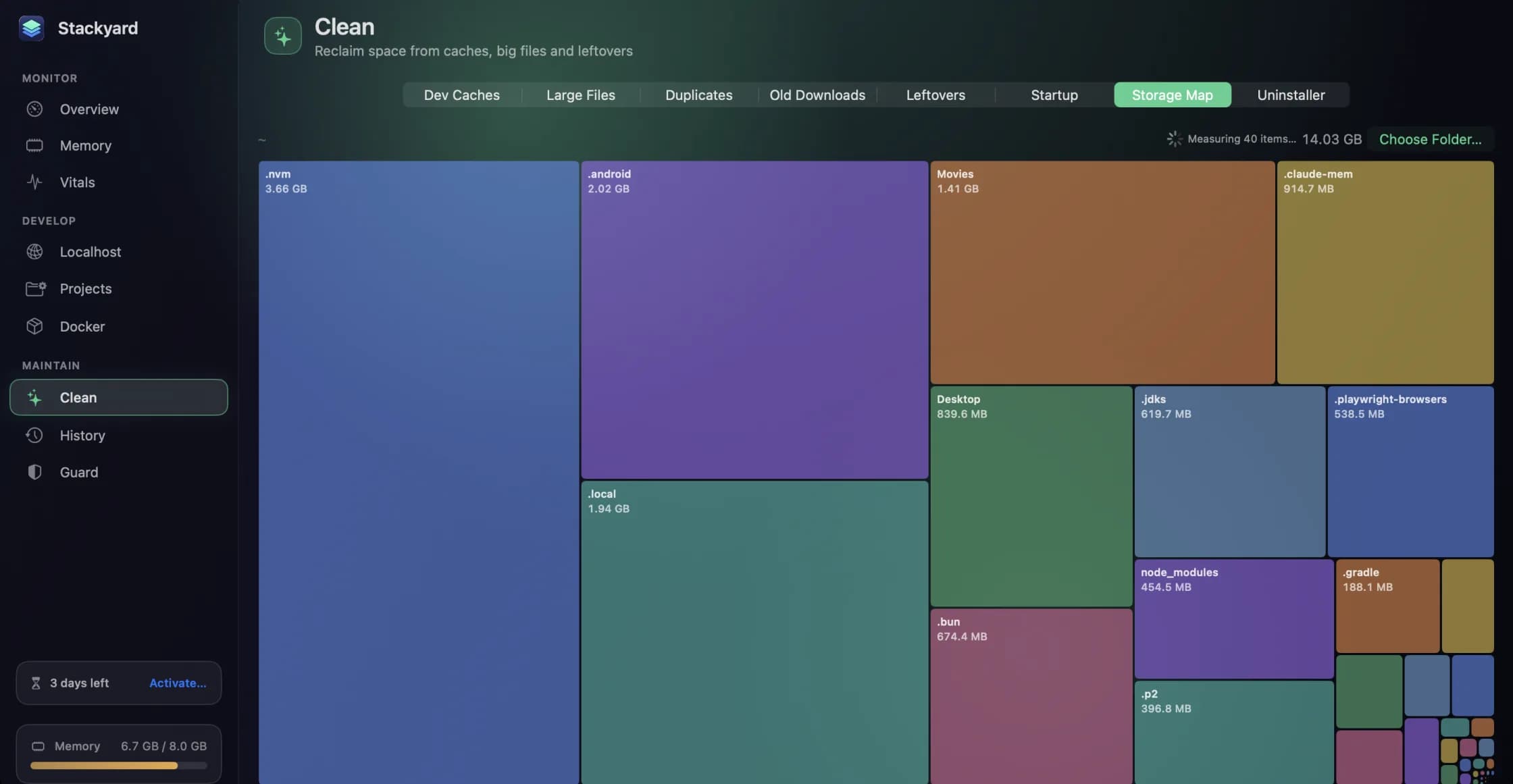
SweepyMac has two views: Space Lens, a live bubble map you can drill into and remove from, and Disk, a read-only treemap of the whole volume. Stackyard's Storage Map draws any folder, your home folder by default, as tiles sized by space, which is where the hidden developer folders show up: .nvm, .android, .cargo, .local. In the screenshot above, those are the three biggest tiles in the home folder.
Reach for: Stackyard's Storage Map for dot-folders, SweepyMac's Space Lens and Disk for everything else.
Uninstalling
Both find the support files, caches, preferences and launch agents an app leaves behind. SweepyMac's Applications module lists every app with its size and handles apps that need an administrator password. Stackyard's Uninstaller takes a dropped app, and if the app is running it offers Quit & Uninstall, or Force Quit & Uninstall for one that will not quit.
Both also list leftovers from apps you have already deleted. SweepyMac only offers support files untouched for sixty days, and leaves them unticked. Stackyard lists them with a warning worth repeating: some of those folders belong to command-line tools, so read the list first.
Reach for: either. SweepyMac's eleven places list is the more thorough.
What starts at login
SweepyMac's Performance module lists the launch agents in your own Library and disables one by moving its file to the Trash. Stackyard's Startup tab shows launch agents and daemons with the app each belongs to, whether it is running, and whether it restarts when quit.
Reach for: Stackyard to understand what an agent is; either to remove it.
Where they do not overlap at all
Only SweepyMac has the Smart Scan, the Mac Health score, the browser privacy cleaner, the malware scanner, the battery screen, the maintenance scripts and Cloud Cleanup.
Only Stackyard has per-app memory with Quit, the orphan list, every local server with a health dot, Share on LAN, Projects, Docker and Homebrew services, Guard, Meeting Mode and the 24-hour memory history.
So which one?
If you are not a developer, SweepyMac. If you are a developer and mainly want your machine responsive and your disk back from build artefacts, Stackyard on its own will do. If you are a developer who also wants a health check, a privacy clean and a malware sweep once a month, run both: Stackyard day to day from the menu bar, and SweepyMac for the monthly routine.
Questions people ask
- Will the two apps fight over the same files?
- No. Both only move things to the Trash when you ask them to, and neither runs a clean on its own. If one has already cleaned a cache, the other simply finds less to offer.
- I am a developer. Do I need both?
- Usually not. Stackyard covers the cleaning a developer needs most. Add SweepyMac if you also want the health score, the browser privacy cleaner, the malware check or Cloud Cleanup.
- Which one cleans developer caches more thoroughly?
- Stackyard. SweepyMac lists Xcode DerivedData, npm, Gradle, Cargo and similar caches, unticked. Stackyard covers a longer list of package managers and also cleans each project's own build folders.
Related reading
- Your Mac's disk is almost full. Here is the order to free it inLook before you delete, take the reversible wins first, hand space back to iCloud, clear what your tools rebuild, then go after the big files, and empty the Trash last, because until you do, nothing you removed has freed a byte.
- Why is my Mac slow? A six-point checklist, in the order worth checkingA slow Mac is almost always one of six things: memory pressure, one process burning the processor, a nearly full disk, too much starting at login, weeks without a restart, or dev processes nobody is watching. How to tell which, and where SweepyMac and Stackyard show it.
- Reclaiming disk from the caches and build folders your tools rebuild on their ownXcode DerivedData, package manager caches, node_modules in a project you have not opened in a month. How Stackyard measures what a developer's Mac can safely give back, why everything goes to the Trash, and what it never touches.
Have a question about any of this?
Write in. The person who built the apps reads every message and replies within two working days.