 AppVerz
Blog / 7 November 2026
FocusLens is half price: $19.99 once, and what that buys
FocusLens is $19.99 instead of $39.98, a one-time licence with no subscription. What the app does for that price, from permission-free tracking and a focus score you can take apart to replayable days and exportable reports, and how to try it first.
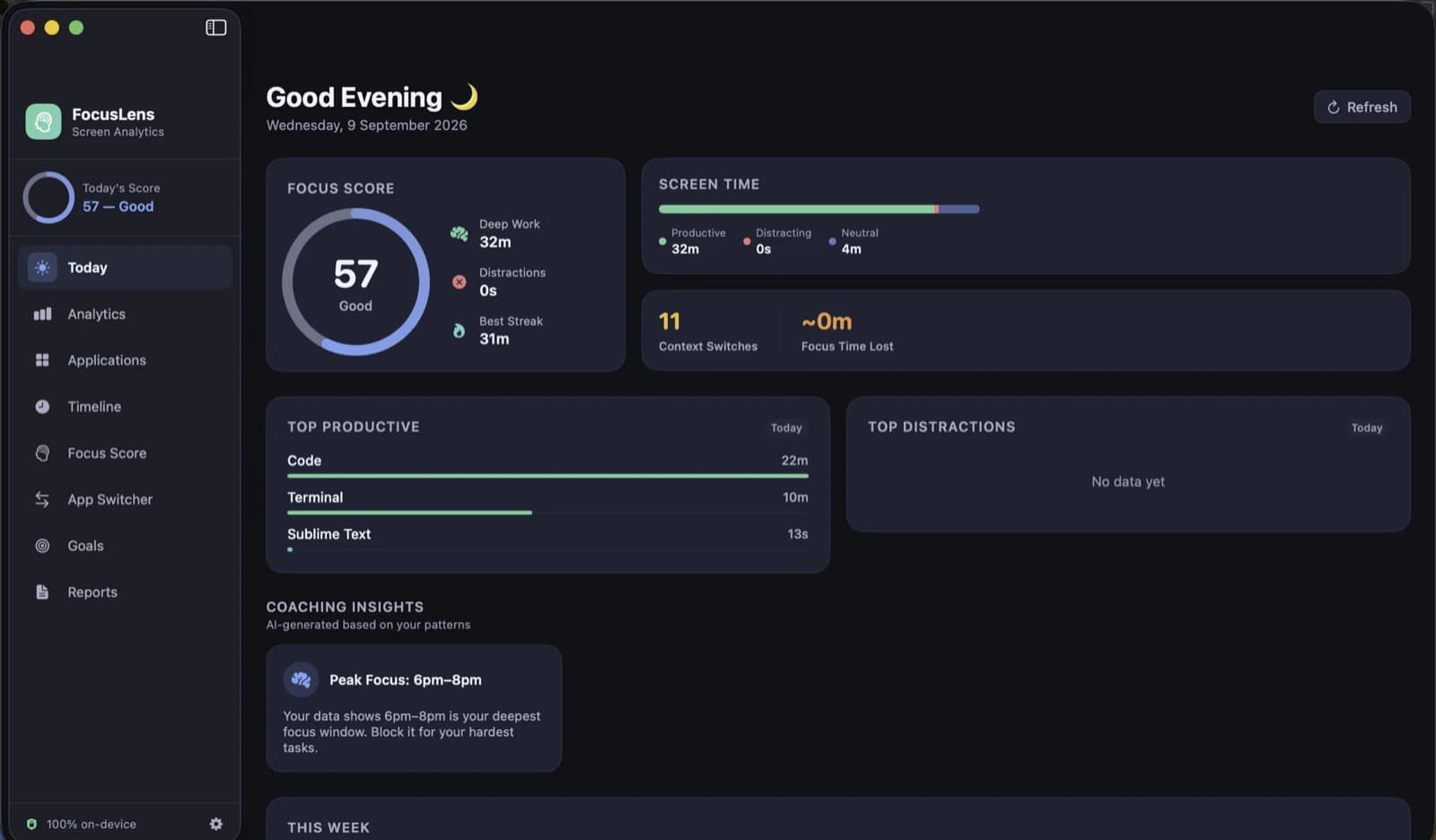
FocusLens is $19.99 right now, down from its list price of $39.98. That is half off, and it is a one-time price: no subscription, nothing that renews, no account to keep. This post covers what the app does for that, so you can judge whether it is worth it before the price changes.
The prices here are the ones on the day this post went up. The FocusLens page always shows the current one beside the list price.
What you are buying
FocusLens is a Mac app that watches which app is in front of you, sorts the day into productive, distracting and neutral time, and tells you plainly where your attention went. It is for anyone whose working day happens on a Mac and who suspects the honest answer to "what did I do today?" is shorter than it feels.
Tracking that asks for nothing
Most time trackers want the Screen Time API, Accessibility access or a browser extension. FocusLens wants none of them. It listens for the same app-activation notifications macOS already sends the Dock, times the gap between one and the next, and throws away anything under five seconds. It stops counting when the screen sleeps, and it never records itself. The full explanation is in how FocusLens tracks without permissions.
A score you can take apart
Each day gets one number out of 100, built from four parts: deep work, context switching, low distraction and your longest unbroken streak. Every part has its own bar and its own ceiling, so a bad day tells you which part went wrong instead of just being bad. The focus score taken apart walks through the arithmetic.
What switching costs
Every jump between apps is counted. The disruptive ones, leaving real work or opening something distracting, are priced at the twenty-three minutes research says it takes to get back. The worst offenders are named, and rapid-fire chains of switches are grouped so you can see the bursts. There is a post on where that 23-minute figure comes from.
Categories you can argue with
Apps start out in productive, communication, distracting, entertainment, utilities or neutral. When FocusLens has one wrong for you, and for somebody it always will, override it in Settings, and every past day recalculates around your answer. More in categories you can argue with.
Goals against real hours
Set a daily target or a limit for any category, and the progress bar reads from the hours you actually logged. Pause a goal, delete it, or have it notify you when it is met. See goals, targets and limits.
Every day, replayable
The timeline keeps a log of every session, with app, category, start, end and duration, for any day you pick, with the day's totals beside it. The Applications view turns the same data around: one app at a time, its sessions, its busiest day and how long you usually stay in it.
Reports that leave the app
Weekly, monthly or a date range of your choosing, with a written summary, the score history and a comparison of the first half against the second. Export a range as a PDF to send on, or as CSV for a spreadsheet. Looking back with reports shows what each one contains, and FocusLens for freelancers shows how the CSV export works for billing.
Your day stays on your Mac
No account, no sign-in, no analytics, no advertising. What FocusLens records stays in its own storage on your Mac and goes when the app goes. It goes online only to check its licence and to fetch signed updates.
What the price covers
- One Mac. A licence activates one Mac. Deactivate this Mac in Settings → License frees it to move to another.
- Twelve months of updates. FocusLens checks for new versions itself, and Check for Updates… in the app menu asks straight away. Updates arrive signed and are verified before they install. After twelve months the app keeps working at the last version you were entitled to, as the terms set out.
- No renewal. $19.99 is the whole cost. There is nothing to cancel later.
Try it first
There is no reason to buy on faith. The download runs the full app free for three days, with no account and no card. Three days is enough to see a real score, a real timeline and at least one day that surprises you. When the trial ends, buy from the FocusLens page, from Settings → License or from the trial-ended screen, then paste the key you are emailed and press Activate. Tracking keeps running after the trial ends, so nothing is lost while you decide.
Payment is handled by Dodo Payments, who take the card and issue the receipt; card details never reach us. Purchases made directly from us can be refunded within fourteen days, no questions asked, under the refund policy.
If you want a feel for it before downloading, a week with FocusLens follows one ordinary working week through the app.
Questions people ask
- How much does FocusLens cost?
- $19.99, once. Its list price is $39.98, so that is half off. There is no subscription and nothing renews. The FocusLens page always shows the current price beside the list price.
- Can I try FocusLens before buying?
- Yes. The download runs the full app free for three days with no account and no card. When the trial ends, a licence key activates it, and tracking keeps running in the meantime, so your history is waiting when you activate.
- How many Macs does a FocusLens licence cover?
- One. Deactivate this Mac in Settings → License frees the licence to move to another Mac.
- Do I get updates at this price?
- Yes. A licence includes twelve months of updates from the date of purchase, which FocusLens finds and installs itself. After that the app carries on working at the last version you were entitled to.
Related reading
- A week with FocusLens: a seven-day experiment in seeing your own attentionInstall it on Monday and change nothing for two days. Fix the categories, replay a day, find the app that breaks your focus most, set one goal, find your best hours, and read the week back on Sunday. What to look at each day, and what people usually find.
- Screen Time tells you how long. FocusLens tells you how wellScreen Time is built into your Mac and counts hours per app across your devices. FocusLens counts the same hours on one Mac, then asks a different question: how much of that time was focused, and what kept breaking it up. What each is for, and why they work side by side.
- FocusLens is not a timesheet. Freelancers should use it anywayFocusLens records which app was in front, not which client you were working for, so it will never fill in an invoice. What it will do is show how many of your billable hours were actually focused, how much the inbox costs you, and where your best hours are, without recording a single client name.
Have a question about any of this?
Write in. The person who built the apps reads every message and replies within two working days.