 AppVerz
Blog / 7 November 2026
Stackyard is on sale: $21 once, and the eight things it does for a developer's Mac
Stackyard is out of preview and on sale: $21 once for one Mac instead of $42, $35 for two, $75 for five, half off, after a three-day free trial. What it does for the money, from memory grouped by app and orphaned node processes to local servers, projects, Docker, rebuildable caches, Guard and the ⌘K palette.
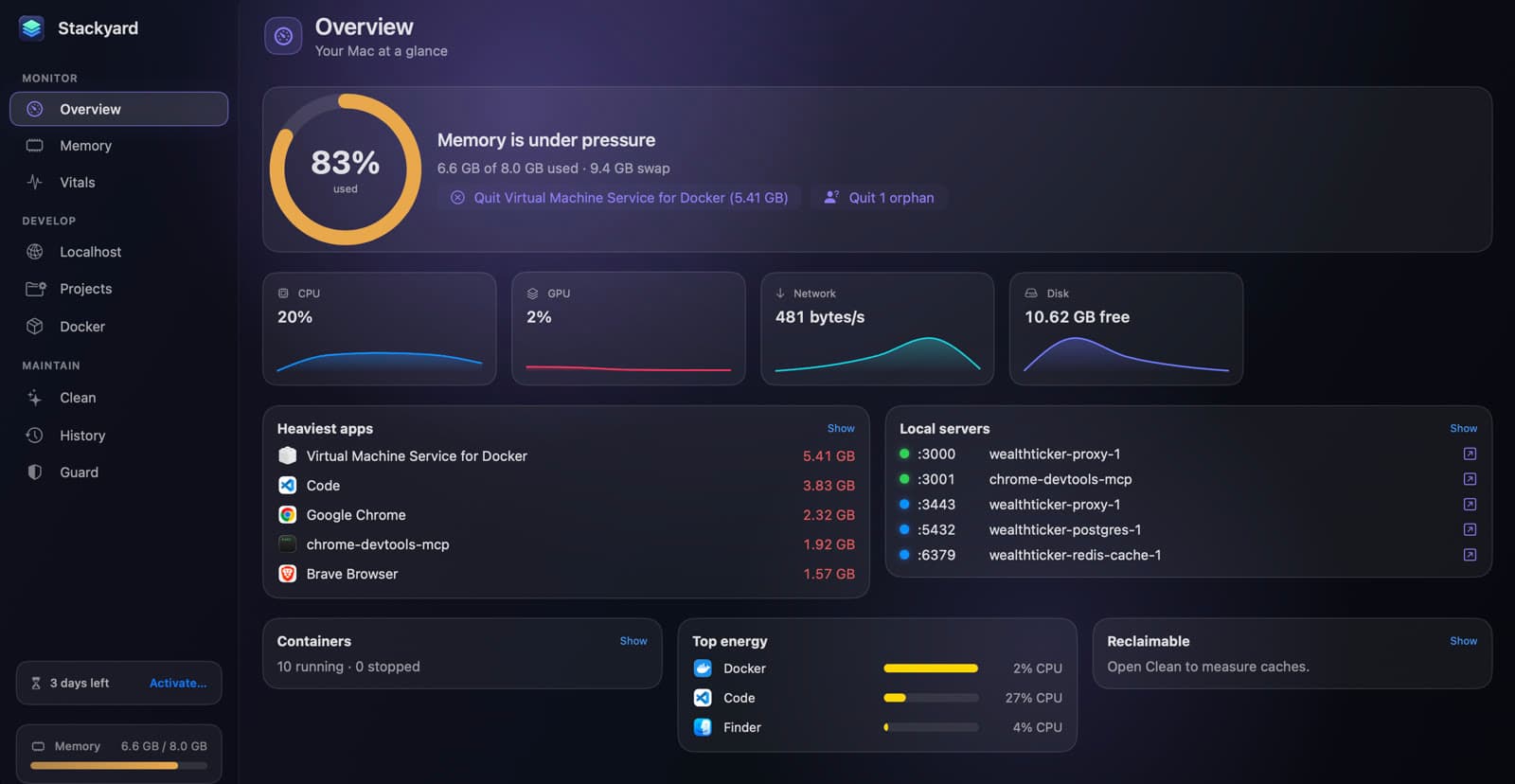
Stackyard is out of its email-only preview and on sale. It costs $21 once for one Mac, after a three-day free trial, with no subscription and no account. This post covers the three plans and what the app does for the money.
What it is
Stackyard is a menu-bar app for people who write code on a Mac. It answers the questions that otherwise mean Activity Monitor, lsof, docker ps and a few du commands: what is eating memory, what is still running from yesterday's terminal, what is on port 3000, and where the disk went. Then it fixes the worst of it in one click. The Overview above is the whole machine on one screen, with buttons to quit the heaviest app and the orphaned process it found.
The eight things it does
Memory, grouped the way you think
Used against total, the memory pressure macOS reports, and every app's helpers folded under the app itself, so Chrome with forty helpers is one row. Filter by High, Medium or Low, then Quit or Force Quit from the same row. Stackyard and Activity Monitor compares the two.
Orphans, and who left them
The node and python processes that kept running after the terminal, editor or AI agent that started them closed. Each one shows who left it (Terminal, VS Code, Cursor, Claude Code, iTerm2, Warp or tmux), its folder and its PID. Quit All clears them in one go. More in orphan dev processes and memory.
Every local server, with a health dot
Every listening port: green for an HTTP server that answers, red for a 5xx or no answer, blue for Postgres, Redis and the other databases. Docker ports carry the container name. Open it, copy the URL, find the process in Finder or stop it.
Share on LAN, with a QR code
Open a server that only listens on your Mac to your phone on the same Wi-Fi, on the original port plus 10000. Nothing is exposed to the internet, and sharing stops by itself when the server exits or the network changes. Local servers, LAN sharing and Docker walks through it.
Projects and containers in one place
Add the folders where you keep code, and Stackyard finds dev and start scripts, .claude/launch.json configs and run.sh files. Start and stop them with a live log, with a warning before a port clash. Docker containers group by Compose project with Start All and Stop All, and Homebrew services get on/off switches.
Disk back from rebuildable caches
Xcode DerivedData, npm, Yarn, pnpm, Bun, Gradle, CocoaPods, Cargo, Playwright and more, plus each project's node_modules, .next and target folders, all measured. Large files, duplicates, old downloads, leftovers, a storage map and an uninstaller sit alongside. Everything goes to the Trash, and cookies, passwords, Xcode Archives and your projects are never touched. See reclaiming disk from dev caches.
Guard, in the background
A notification when memory pressure stays high for thirty seconds, and leak detection for apps that grow steadily for forty-five minutes. Orphans can be quit after a time you choose, and apps quit when you have not used them. Meeting Mode frees memory for a call and reopens everything afterwards. History keeps a day of memory, in total and by app. Guard, History and Meeting Mode covers each setting.
⌘K for everything
Quit any app, open or stop any port, start any project or container, clean any cache or jump to any section, with a few letters in the command palette. Two widgets and a stackyard:// link scheme cover the rest.
The plans
There is one way to pay, once, for one, two or five Macs:
| Macs | Price | List price | Per Mac |
|---|---|---|---|
| 1 | $21 | $42 | $21 |
| 2 | $35 | $70 | $17.50 |
| 5 | $75 | $150 | $15 |
These are the prices on the day this post went up. Every plan is half its list price right now. The buy page always shows the current price beside the list price.
Seat count follows your Macs, not your people. A work laptop and a desk machine want the two-Mac plan. A licence includes twelve months of updates, which Stackyard finds and installs itself; after that it keeps working at the last version you were entitled to, as the terms set out.
Try it, then buy
The download runs the full app free for three days, with no account and no card. The badge at the bottom of the sidebar counts the days down. Three days covers a normal working stretch, which is long enough to find out how many orphans your editor leaves behind.
When you are ready, pick a plan on the buy page. Dodo Payments takes the payment, issues the receipt and emails you the licence key; card details never reach us. Click the badge at the bottom of Stackyard's sidebar, paste the key and press Activate. Deactivate This Mac… in the same sheet frees the slot for another Mac. Purchases made directly from us can be refunded within fourteen days, no questions asked, under the refund policy.
It needs macOS 14 Sonoma or later and runs on Apple silicon and Intel. Full Disk Access is optional: only Safari's cache and a few protected folders need it. A developer's Monday with Stackyard shows a full day with it, and the user guide covers every section.
Questions people ask
- How much is Stackyard?
- $21 for one Mac (list $42), $35 for two (list $70) and $75 for five (list $150), paid once. That is half off. There is no subscription. The buy page always shows the current price beside the list price.
- Can I try it first?
- Yes. The download runs the full app free for three days, with no account and no card. The badge at the bottom of the sidebar counts the days down, and a licence key activates it when you are ready.
- Do I get updates?
- Yes. A licence includes twelve months of updates from the date of purchase, which Stackyard finds and installs itself. After that it carries on working at the last version you were entitled to.
- Does Stackyard need Full Disk Access?
- No. It is optional, and only Safari's cache and a few protected folders need it. Everything else works without it.
Related reading
- A developer's Monday morning with Stackyard, in eight stepsClear what last week left running, check what is on your ports, start the projects you need without a port clash, bring up the containers, and set the machine up for the day's calls. The start-of-week routine we use, with the shortcut for each step.
- Activity Monitor is free and already on your Mac. Here is what Stackyard addsActivity Monitor sees every process, and it is the right tool for a deep dive. What it does not do is think like a developer: group an app's helpers, tell you who left a node process running, put a health dot on a port, or start your project. An honest comparison.
- SweepyMac and Stackyard on the same Mac: where they overlap, and which to reach forBoth clean caches, both find duplicates and big files, both uninstall apps properly, and both send everything to the Trash. Tool by tool, where the two apps do the same job, where one goes further, and which one a developer actually needs.
Have a question about any of this?
Write in. The person who built the apps reads every message and replies within two working days.