 AppVerz
Blog / 9 November 2026
Does a Mac need a cleaner? An honest answer from people who sell one
Plenty of Macs do not. macOS looks after its own caches, and clearing them does not make anything faster. Who can skip a cleaner entirely, what you can do for free, and the three situations where one earns its price.
Your Mac probably does not need a cleaner if its disk is half empty. We sell one, and that is still the first thing we would say. If you have 200 GB free, no unexplained slowdowns and no apps you are trying to get rid of, close this tab and go and do something else.
The rest of this post is for working out whether that describes you.
What macOS already does
A Mac is not a machine that silts up by default. Apps write caches, and macOS can reclaim purgeable space when the disk gets tight. Time Machine's local snapshots are cleared the same way. Memory that looks "used" is mostly memory being put to work, and macOS hands it back when something else needs it.
System Settings has free tools too. General › Storage shows what is taking the room and offers recommendations, including emptying the Trash automatically and storing files in iCloud. General › Login Items (Login Items & Extensions on macOS 15 and later) shows what starts with your Mac. Battery shows your battery's condition. Those three screens cover a lot.
What a cleaner will not do
Two claims from this category deserve some suspicion.
"Clearing caches speeds up your Mac." A cache is there to save work. Delete it and the app has to do that work again, so the first launch afterwards can be slower. Clearing caches gets you disk space. If your disk was not short of space, it got you nothing.
"Your Mac has 2,847 problems." A pile of old log files is not a problem. Scare counts are how a cleaner sells its upgrade, and a tool that invents urgency is one you should not hand your files to. We wrote up the rest of that list in what a Mac cleaner should never do.
When one earns its price
Your disk really is short
If you are on a 256 GB Mac, or anything over 90 percent full, the free screens start to run out. System Settings can tell you that Documents is large. It will not draw your folders to scale or tell you that three copies of one video are spread across two projects.
SweepyMac's Disk module shows the whole volume, Space Lens lets you click down into a folder while it is still measuring, and Duplicates finds byte-identical files and leaves one copy of every set behind. Our post on freeing a full disk gives the order to do it in.
You remove apps and want them properly gone
Dragging an app to the Trash leaves its preferences, caches and launch agents in your Library. On one Mac over one year, that is a small mess. On a Mac you have owned for six years, it adds up, and some of those launch agents keep running. macOS has no built-in screen for this. SweepyMac's Applications module lists what each app would leave behind and takes it along, into the Trash so you can change your mind.
You want to see the whole machine in one place
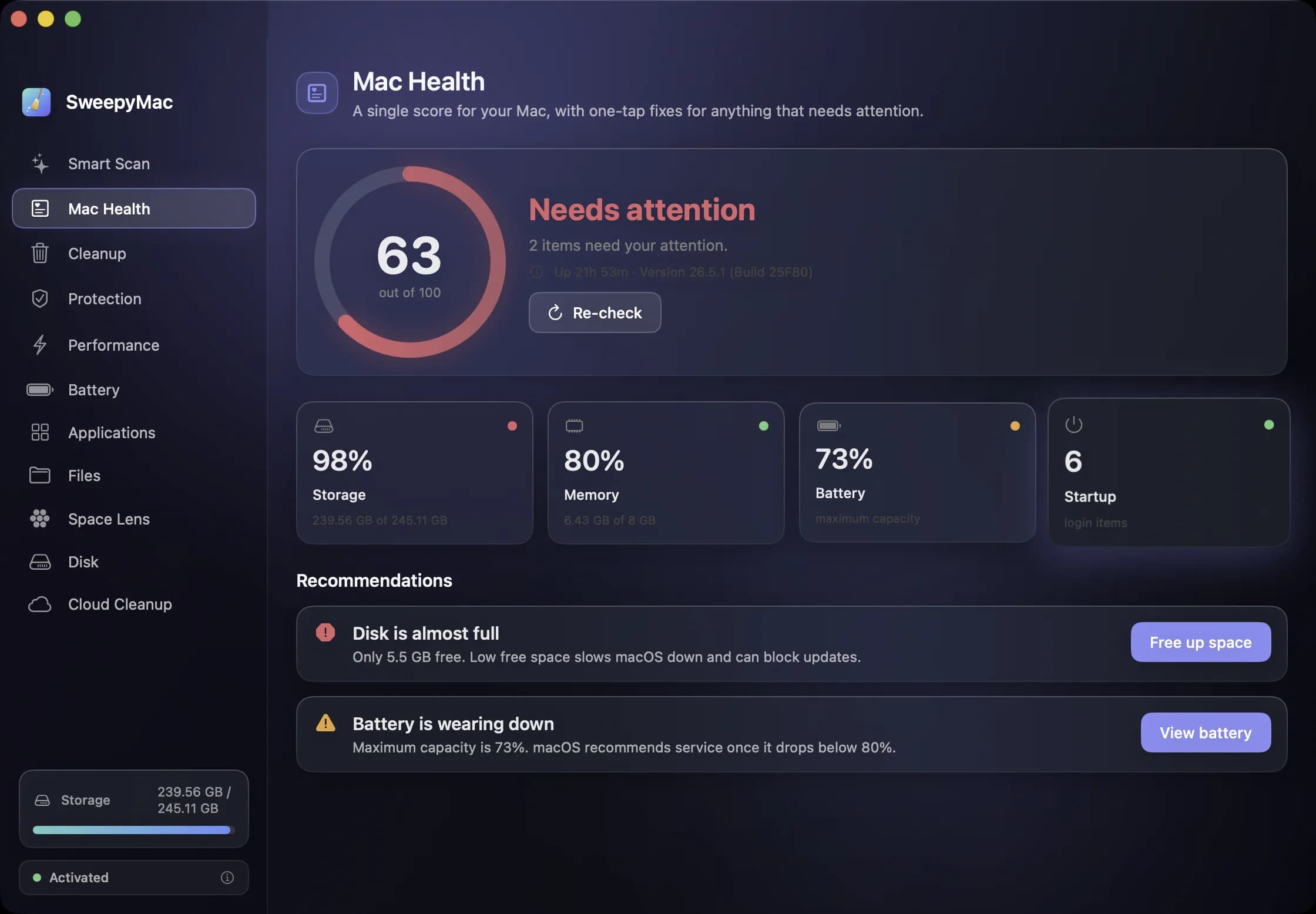
Storage, memory, battery, startup items, browser data and a malware check live in different corners of macOS, and some are not there at all. Mac Health rolls the first four into one score out of 100 and writes the problems as sentences. "Disk is almost full" comes with a button that goes to the fix. If you look after a Mac for someone less technical, that one screen is most of the value.
The free route, if you would rather
If you are on the fence, try this first. It costs nothing.
- Open System Settings › General › Storage and act on what it recommends.
- Empty the Trash. Files in it still take up space.
- Sort your Downloads folder by size and delete what you recognise as finished with.
- Check General › Login Items and turn off anything you do not want at login.
- Restart, if it has been a couple of weeks.
If that solves it, you did not need us.
The cheapest way to find out
If it did not solve it, SweepyMac runs in full for three days, with no account and no card. Run Smart Scan and read the total, then open Mac Health and read the score. Nothing is removed until you press Clean, only the conservatively safe categories arrive ticked, and what you do remove goes to the Trash with an Undo.
A small total and a good score means your Mac is fine and you can delete the app. A large total or a score in the fifties means you have found something worth fixing. After the trial it is from $14.99 a year for one Mac, or $59.96 once. Download it from its page.
Questions people ask
- Will clearing caches make my Mac faster?
- Generally no. Caches exist to make things faster, and an app rebuilds what it needs the next time it runs, so the first launch afterwards can be a little slower. The reason to clear them is to get disk space back.
- How full is too full?
- SweepyMac starts warning at 90 percent used or under 8 GB free. Below that line, disk space is unlikely to be what is bothering your Mac.
- Can I try SweepyMac without paying?
- Yes. The full app runs for three days with no account. If Smart Scan finds very little and the health score is fine, you have your answer and owe nothing.
Related reading
- Bought or inherited a used Mac? What to check before you trust itFour checks to make before any money changes hands, none of which need an app. Then what to do with a Mac that has been properly erased, and a fuller pass for the hand-me-down that still has someone else's years on it.
- What is System Data on a Mac, and how much of it can you get back?System Data is a catch-all, not a thing you can open. What usually fills it, which parts macOS will clear by itself, which parts are safe for you to remove, and which ones a cleaner should refuse to touch.
- SweepyMac is up to 66% off: every plan, and the eleven tools it pays forEvery SweepyMac plan is discounted right now: annual from $14.99 instead of $24.99, buy once from $59.96 instead of $149.99. The six prices side by side, which one to pick, and what the app does for the money, from Smart Scan and Mac Health to Space Lens, the uninstaller and Cloud Cleanup.
Have a question about any of this?
Write in. The person who built the apps reads every message and replies within two working days.