 AppVerz
Blog / 9 November 2026
Bought or inherited a used Mac? What to check before you trust it
Four checks to make before any money changes hands, none of which need an app. Then what to do with a Mac that has been properly erased, and a fuller pass for the hand-me-down that still has someone else's years on it.
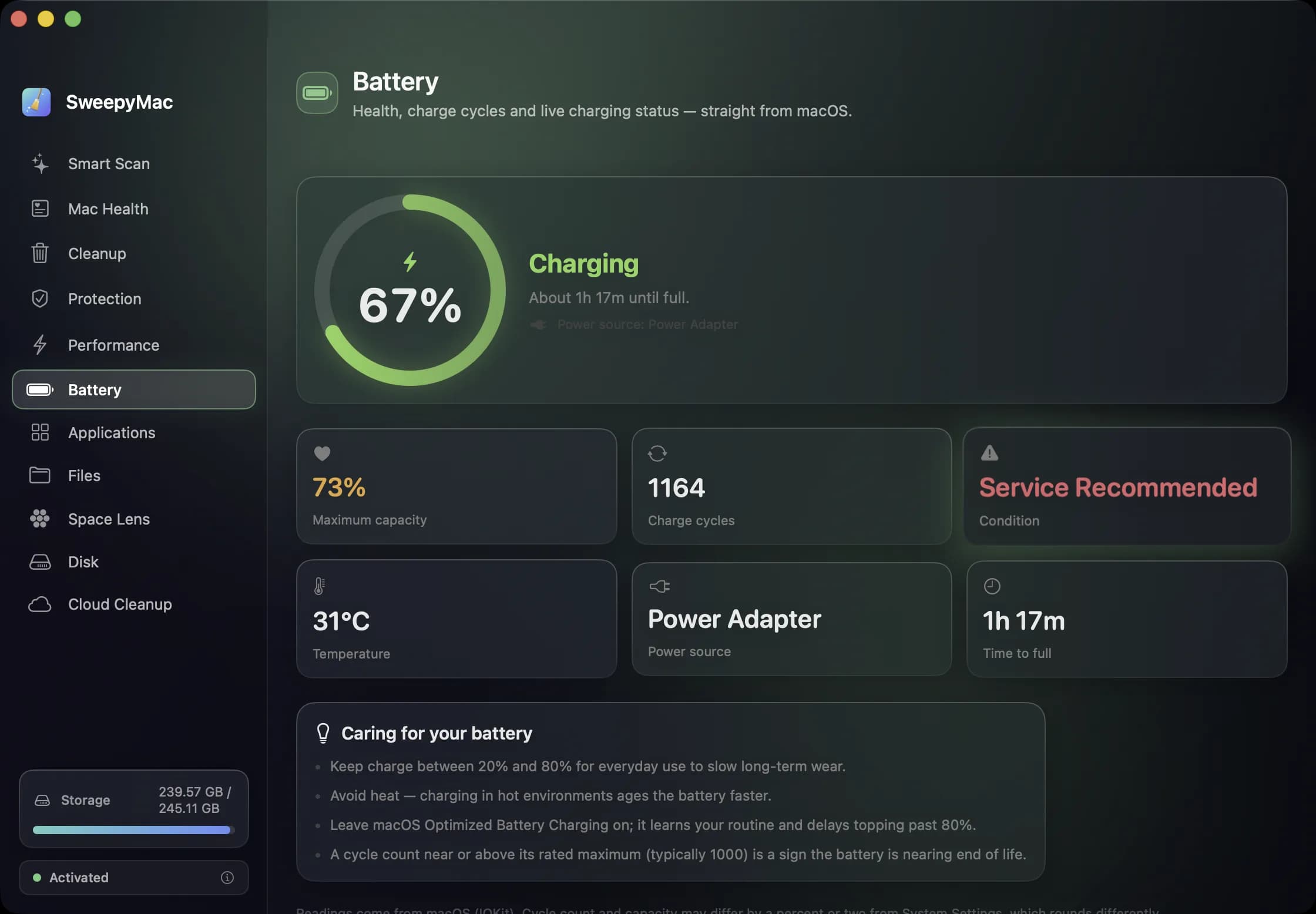
The screenshot at the top of this post is a real battery: 1,228 cycles, 75 percent of its original capacity, and macOS saying Service Recommended. You would want to know that before agreeing a price, and it takes about a minute to find out.
Most of what matters on a used Mac can be checked with what macOS already includes. We will get to our own app later, and for some buyers it will not be needed at all.
Before you pay: four checks
1. Activation Lock
This is the one that can leave you with a Mac you cannot use. Hold Option, click the Apple menu, and choose System Information. Under Hardware Overview on Macs with Apple silicon or a T2 chip you will see Activation Lock Status. It should say Disabled.
If it says Enabled, ask the seller to sign out of Find My on the spot, while you watch. A seller who cannot or will not do that is the answer to the question.
2. Device management
Companies enrol their Macs so they can control them remotely, and a former work Mac can still belong to its old owner. Look in System Settings › General for Device Management (some macOS versions call it VPN & Device Management). No entry and no profile is what you want. If you see a company's profile, walk away unless the seller can produce a release from that company.
3. Coverage and identity
The serial number is in System Settings › General › About. Enter it at Apple's check coverage page to confirm the model and year match what you were told, and whether any warranty remains.
4. The battery
Open System Settings › Battery and click the ⓘ next to Battery Health for maximum capacity and condition. The cycle count is in System Information under Power. Apple publishes the cycle limit for each model and says its batteries are designed to keep up to 80 percent of their capacity at that limit, so compare against your specific Mac. A worn battery is not a dealbreaker. It is a price negotiation, and the cost of a replacement should come off.
If you are buying: insist on an erase
The seller should run System Settings › General › Transfer or Reset › Erase All Content and Settings, ideally in front of you. (Older Intel Macs without a T2 chip are erased from Recovery instead.) Then set the Mac up yourself. During setup, a Remote Management screen is a sign the Mac is still enrolled, and it is the moment to stop.
A freshly erased Mac has nothing on it to clean. Do not let anybody, including us, tell you otherwise.
If it is a hand-me-down you cannot erase
A parent's old MacBook, a partner's previous machine, a Mac with years of someone's photos still on it. Here you inherit everything, and a one-hour look around is worth doing. SweepyMac's three-day free trial covers it comfortably. It needs macOS 14 Sonoma or later, so check that first in About.
- Grant Full Disk Access when it asks. Without it the scans see less, and they tell you so.
- Open Mac Health for a score out of 100 built from storage, memory, battery and startup items. Each problem is written as a sentence with a button that goes to the fix.
- Run the Malware tab in Protection. It checks launch agents and daemons, file contents against signed definitions, code signatures on launch items, cron jobs and browser extensions. It is an on-demand scanner and not real-time antivirus, and it lists what it could not read rather than skipping it silently.
- Look at login items under Performance. Years of use leave updaters and helpers from software nobody remembers installing. Disabling one moves its launch agent to the Trash, with Undo.
- Sort Applications by size. Remove what nobody uses, leftovers included.
- Open Battery for capacity, cycles and macOS's own verdict in one place. Our post on battery health explains how to read it.
- Leave the files alone for now. Someone's documents are not junk. Point Large & Old at Downloads rather than at the whole home folder, and go through the list by hand.
Everything SweepyMac removes goes to the Trash, which matters more than usual on a Mac whose files you did not create. Wait a week before emptying it.
Before the last owner forgets
One more for hand-me-downs. Ask the previous owner to sign out of iCloud and Messages properly, and to check that nothing they need was only on this Mac. Those are much easier conversations to have now than after the Trash has been emptied.
SweepyMac is free for three days, then from $14.99 a year for one Mac or $59.96 once. Download it from its page.
Questions people ask
- How many battery cycles is too many on a used MacBook?
- It depends on the model, because Apple publishes a different limit for different Macs, and its batteries are designed to retain up to 80 percent of their original capacity at that count. Look up the model on Apple's battery cycle count page, and treat maximum capacity and macOS's condition verdict as the more direct evidence.
- Does SweepyMac replace erasing a used Mac?
- No. Erasing is the only way to be sure nothing of the previous owner's remains. SweepyMac is for looking at the battery and hardware health afterwards, or for a Mac you cannot erase because a family member's files are staying on it.
- Can the malware check prove a Mac is clean?
- No scanner can. SweepyMac's is an on-demand scan of known threats and the places malware hides, and it lists the locations it could not read. If you have any reason to distrust a Mac, erase it.
Related reading
- What is System Data on a Mac, and how much of it can you get back?System Data is a catch-all, not a thing you can open. What usually fills it, which parts macOS will clear by itself, which parts are safe for you to remove, and which ones a cleaner should refuse to touch.
- Your Mac's disk is almost full. Here is the order to free it inLook before you delete, take the reversible wins first, hand space back to iCloud, clear what your tools rebuild, then go after the big files, and empty the Trash last, because until you do, nothing you removed has freed a byte.
- Why is my Mac slow? A six-point checklist, in the order worth checkingA slow Mac is almost always one of six things: memory pressure, one process burning the processor, a nearly full disk, too much starting at login, weeks without a restart, or dev processes nobody is watching. How to tell which, and where SweepyMac and Stackyard show it.
Have a question about any of this?
Write in. The person who built the apps reads every message and replies within two working days.