 AppVerz
Blog / 6 November 2026
SweepyMac, FocusLens or Stackyard: which one do you actually need?
Three Mac apps from one small studio, each for a different problem. A cleaner for a full or tired Mac, an attention tracker for a day that vanished, and a menu-bar tool for a developer's machine. Who each one is for, what it costs, and when you need more than one.
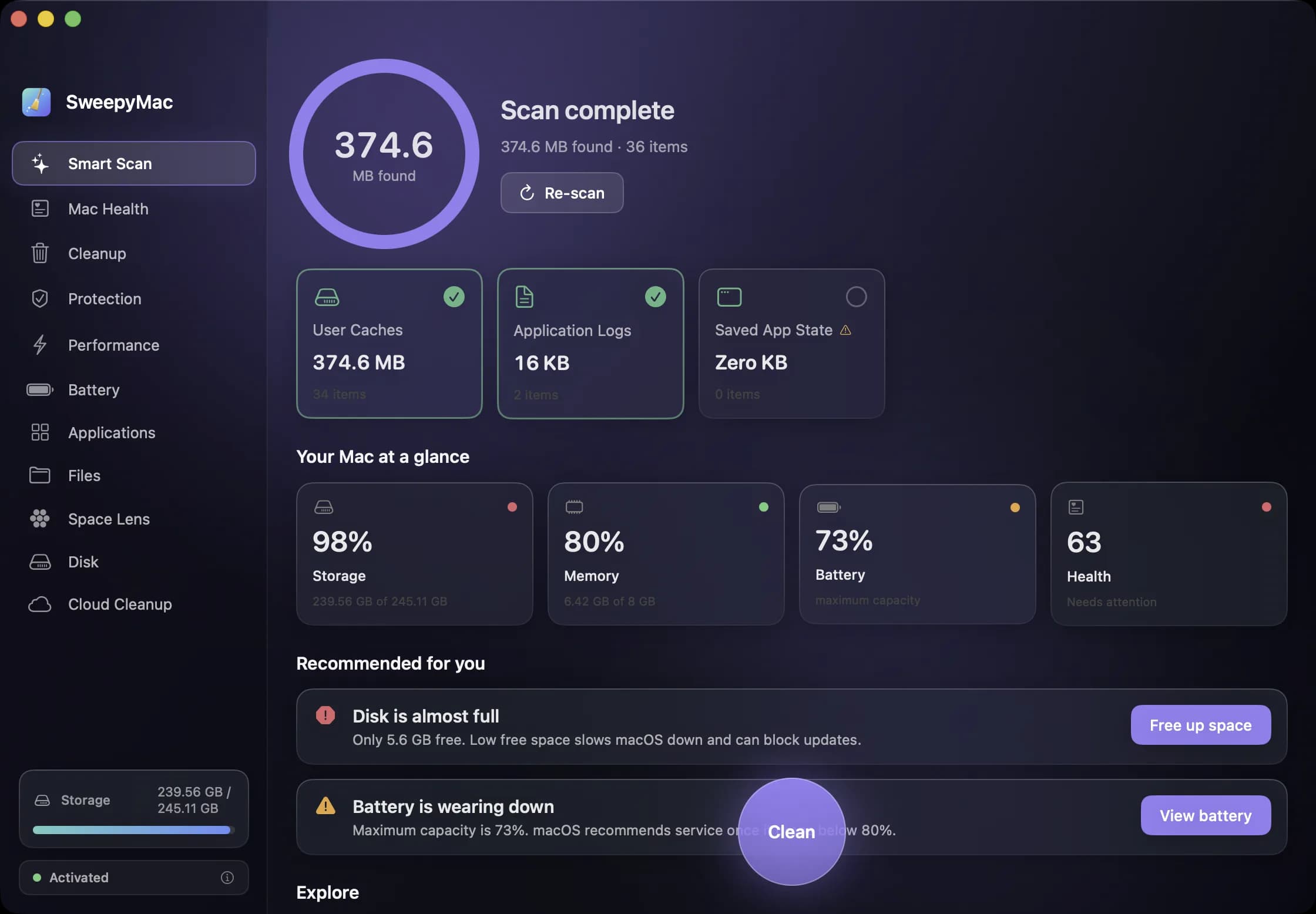
AppVerz makes three Mac apps, and people regularly write in asking which one they should start with. The honest answer is that they are not three tiers of one product. Each solves a different problem, and most people only have one of those problems at a time. This post is the short version of each, so you can pick the one that matches yours.
Your Mac is full, slow or untidy: SweepyMac
SweepyMac is the cleaner. It is for the Mac that has said "Your disk is almost full" once too often, the one that has been up for three weeks with forty things starting at login, or the one you inherited from someone else and have never looked inside.
It is eleven tools in one window: a one-click Smart Scan, a health score out of 100, junk cleanup, a browser privacy cleaner and a malware check, live system meters, a battery screen, an uninstaller that takes an app's leftovers with it, large and duplicate file finders, a live map of your disk, and a way to hand space back to iCloud without deleting anything.
What sets it apart is how it removes things. Everything goes to the Trash with an Undo, nothing is pre-selected unless it is conservatively safe, and every group opens up to show what is inside before you press anything. The post on what a Mac cleaner should never do explains why we built it that way.
Who it is for: anyone with a Mac, technical or not. What it costs: a three-day trial with no account, then from $14.99 a year for one Mac, or a one-off licence. The plans post has the full table.
Your day disappeared and you want to know where: FocusLens
FocusLens is not a cleaner at all. It watches which app is in front of you, sorts the day into productive, distracting and neutral time, and turns it into a focus score you can take apart into four parts. It counts every switch between apps and prices the disruptive ones at the twenty-three minutes research says it takes to get back into the work.
It is for the person who ends a ten-hour day with two hours of work to show for it and wants to know what happened to the other eight. Writers, developers, students, anyone whose job is mostly one screen.
It asks for no permission to start tracking: no Screen Time, no Accessibility access, no browser extension. It records the app name, its category and when the session started and stopped, and nothing else. Not window titles, not URLs, not keystrokes. And it makes no network requests at all, so nothing it records ever leaves the Mac.
Who it is for: anyone who works at a Mac and wants to see their attention honestly. What it costs: nothing. It is in limited preview while the release build is notarized, so for now you ask for a build and one comes back by email.
You write code and your Mac is fighting you: Stackyard
Stackyard is a menu-bar app for Mac developers. It shows what is eating memory, grouped by app so Chrome with forty helpers is one row. It finds the node and python processes your terminal, editor or AI agent left running and tells you who left each one. It lists every local server with a health dot, starts and stops your projects and Docker containers, and reclaims disk from caches your tools rebuild on their own.
It is for the afternoon when the fan is on, port 3000 is "already in use" by something you cannot find, and node_modules folders from last spring are holding twenty gigabytes hostage.
Because it has to quit other apps and processes, Stackyard cannot be sandboxed, which is why it is a signed download rather than a Mac App Store app.
Who it is for: developers, especially web and full-stack ones running local servers and Docker. What it costs: nothing during the preview. Ask on its page and a build comes by email.
When you need two of them
The most common pairing is Stackyard and FocusLens for developers: one keeps the machine responsive, the other keeps the day honest. They do not overlap at all.
SweepyMac and Stackyard do overlap, on cache cleaning, duplicates, large files and uninstalling. A developer can usually get by with Stackyard alone; someone who also wants the health score, browser privacy cleaning, the malware check or Cloud Cleanup will want SweepyMac too. The post on running both on the same Mac goes through the overlap tool by tool.
SweepyMac and FocusLens cover the two halves of a Mac that feels slow: the machine and the person using it.
What all three have in common
Every one of them is a native Mac app. None of them has an account, analytics or advertising. All three need macOS 14 Sonoma or later. And one person makes them and reads every message sent about them, so if none of the three fits what you need, say so: that is how the next one gets decided.
Questions people ask
- Do the three apps share an account or a subscription?
- No. None of them has an account. SweepyMac is sold with its own licence key, and FocusLens and Stackyard are free previews you ask for by email.
- Can I run all three on the same Mac?
- Yes. They do different jobs and do not depend on each other. SweepyMac and Stackyard overlap on a few cleaning tools, which is covered in its own post.
- Which of them go online?
- FocusLens never does. SweepyMac fetches one signed malware definitions file and checks a licence key. Stackyard only goes online to check a licence key if you enter one.
Related reading
- Why our apps make no network requests, and the one exceptionFocusLens has no network code at all. SweepyMac has one connection, for a signed malware definitions file. Here is what no telemetry means in practice, what we give up for it, and how you can check the claim yourself.
- Your Mac's disk is almost full. Here is the order to free it inLook before you delete, take the reversible wins first, hand space back to iCloud, clear what your tools rebuild, then go after the big files, and empty the Trash last, because until you do, nothing you removed has freed a byte.
- SweepyMac and Stackyard on the same Mac: where they overlap, and which to reach forBoth clean caches, both find duplicates and big files, both uninstall apps properly, and both send everything to the Trash. Tool by tool, where the two apps do the same job, where one goes further, and which one a developer actually needs.
Have a question about any of this?
Write in. The person who built the apps reads every message and replies within two working days.