 AppVerz
Blog / 9 November 2026
AI coding agents leave a lot running on your Mac. How to keep up with them
Agents start dev servers, spawn test browsers and create worktrees, then finish and move on. What that leaves behind in memory, ports and disk, the commands to check it, and how Stackyard shows which agent left what.
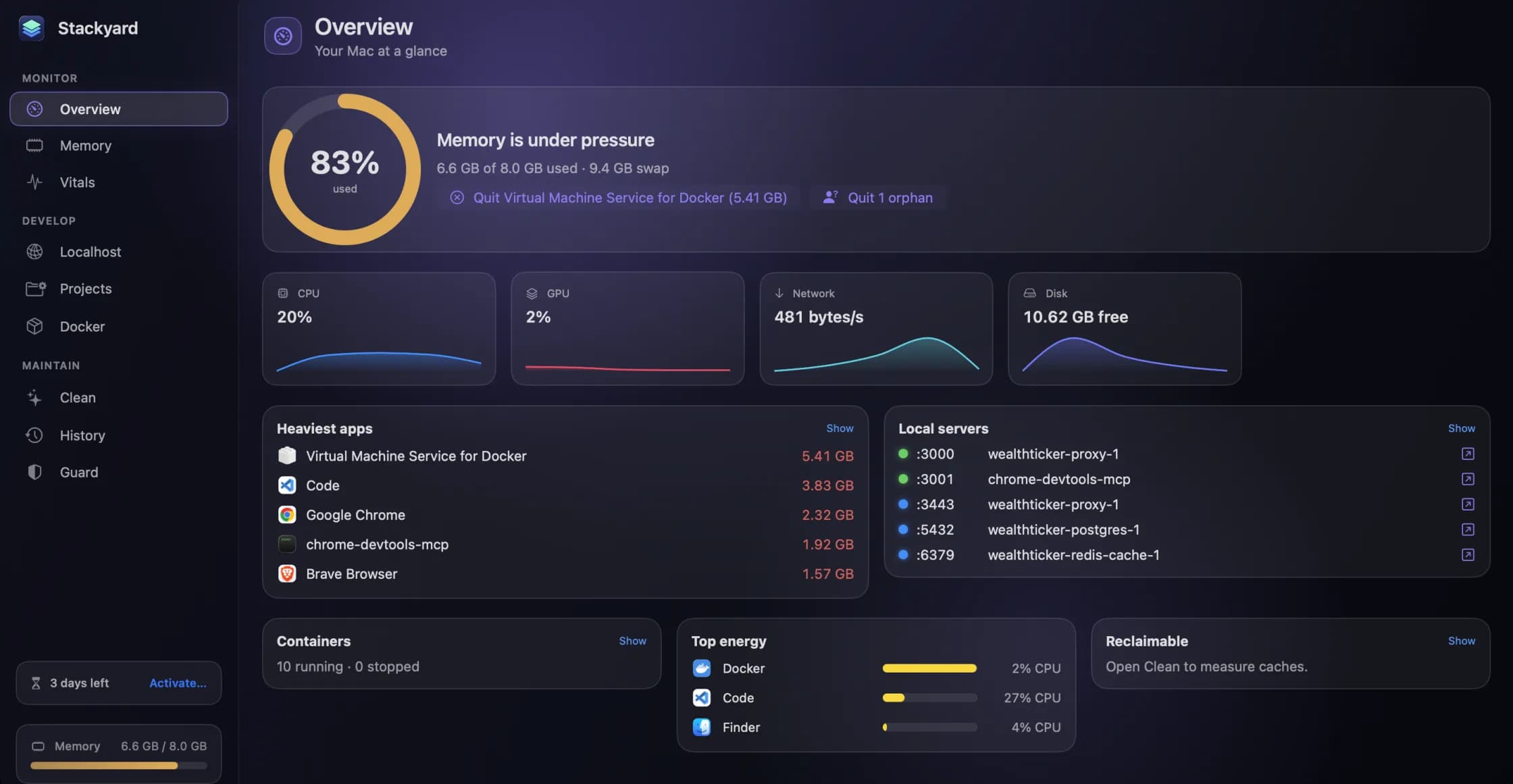
Ask an agent to fix a bug and watch what it does. It starts your dev server to check the page. It runs the test suite, which opens a headless browser. If you are working in parallel, it makes a git worktree and installs dependencies there as well. Then it says it is finished, and you go on to the next thing.
Nothing in that sequence is wrong. It is only that nobody is responsible for what is still running afterwards, and when you run three agents across an afternoon, your Mac finds out. Here is what accumulates and how to deal with it.
What gets left behind
Dev servers. An agent starts one in the background so it can check its work. Session over, server still up, port still held. The next session cannot get port 3000 and quietly uses 3001, and now you have two.
Watchers and test runners. A vitest --watch or a type checker in watch mode keeps a process busy on a project you have stopped thinking about. These often cost CPU as well as memory.
Headless browsers. Playwright and Puppeteer each run a real browser, and a run that was interrupted can leave one behind.
Worktrees. This is the disk one. A worktree shares your git history but not your untracked files, so each one gets its own node_modules and its own build output. Three agents on three branches of a large project can mean three full copies of the dependency tree.
Browser downloads. Playwright's browsers sit in a cache per version, and they add up across projects that pin different versions.
Checking by hand
You can get a rough picture with four commands.
# Node and Python processes, heaviest first
ps -eo pid,ppid,rss,command | grep -E 'node|python' | grep -v grep | sort -k3 -nr | head -20

# Everything listening
lsof -nP -iTCP -sTCP:LISTEN

# Your worktrees, and tidy the records of any you deleted
git worktree list
git worktree prune

# Size of a project's dependencies
du -sh node_modules
A parent PID of 1 in the first command is a strong hint that a process has been orphaned. What ps does not tell you is which session or tool it came from, and that is usually what you need in order to decide whether you can kill it.
Which agent left what
Stackyard is a menu-bar app for Mac developers. Its Orphans filter, in the Memory section, lists dev processes such as node and python that kept running after the terminal, editor or AI agent that started them had closed. Each one says who left it, with its folder and its PID, naming Claude Code, Cursor, VS Code, Terminal, iTerm2, Warp and tmux.
So six identical node rows become a Next.js server Claude Code started in one project and a Vite server Cursor started in another. You can quit one, or press Quit All. The orphans post has the detail.
Localhost does the same for ports. Every listening server gets a health dot and shows who started it, so you can tell at a glance that the thing on 3001 is an agent's leftover and that the thing on 3000 is yours.
Letting it clear up by itself
If you run agents every day, doing this by hand gets old. Guard, which runs in the background, has three settings that suit this kind of work:
- Quit orphans automatically, after 15 minutes, 30 minutes or an hour. Databases and background services such as Postgres, Redis, Ollama and nginx are left alone, so your local model server survives.
- Memory pressure alerts, which notify you when pressure stays high for 30 seconds. That is often your first sign that a run has got out of hand.
- Leak detection, which flags an app whose memory grows steadily at about 1 GB an hour or more over 45 minutes. A single jump does not count, so a big build will not trigger it.
History keeps 24 hours of memory by app, with the peak marked. When your Mac went to pieces at 3pm while you were in a meeting, you can see what did it.
Getting the disk back
Add your code folder, and any folder where you keep worktrees, to Projects. Each project's details list its rebuildable folders with sizes: node_modules, .next, target, .venv, dist, build and others. Tick what you want gone and it goes to the Trash. Your tools recreate them on the next build.
Turn on Stale to list projects whose source has not changed in 30 days or more. A worktree from a finished task usually shows up there, and it is often the best space you will reclaim all week. When you are done with one for good, remove it properly with git worktree remove <path>.
Clean covers the shared caches, including Playwright, Puppeteer and every package manager. Select All Safe picks what rebuilds itself, and cookies, passwords, Xcode Archives and your projects are never touched. The dev caches post has the full list.
Give agents a known way to start things
The neatest fix happens before the mess. Stackyard's Projects reads .claude/launch.json configs alongside package.json scripts and run.sh files, so a project your agent launches and a project you launch can be the same named entry, started and stopped from one list with a live log. It warns you before a port clash rather than letting a second copy drift onto the next free port.
Stackyard runs entirely on your Mac, with no account and no analytics. It reads process names and ports. It does not read your code, and it does not know what your agent was asked to do. It is free for three days, then from $21 once. Download it from its page.
Questions people ask
- Which tools can Stackyard identify as the source of an orphan process?
- It names the terminal, editor or agent that started a process, including Terminal, VS Code, Cursor, Claude Code, iTerm2, Warp and tmux.
- Will automatic clean-up kill something an agent is still using?
- Guard only quits orphans, meaning dev processes whose parent tool has already closed, and only after the delay you set: 15 minutes, 30 minutes or an hour. Databases and background services such as Postgres, Redis, Ollama and nginx are left alone.
- Does Stackyard send my code or process list anywhere?
- No. Everything it reads stays on your Mac. It goes online only to check a licence key and to look for updates.
Related reading
- Port 3000 is already in use on a Mac: find it, stop it, and keep it stoppedThe exact commands to find what is holding a port and stop it, why the process sometimes comes straight back, what is really on port 5000, and how to see every port on your Mac at once.
- Web development on an 8 GB Mac: how to make it work, and when to stop tryingPlenty of good Macs shipped with 8 GB and are still in daily use. Why the memory figure you are watching is the wrong one, the three changes that help most, and the honest signs that you need a new machine.
- Activity Monitor is free and already on your Mac. Here is what Stackyard addsActivity Monitor sees every process, and it is the right tool for a deep dive. What it does not do is think like a developer: group an app's helpers, tell you who left a node process running, put a health dot on a port, or start your project. An honest comparison.
Have a question about any of this?
Write in. The person who built the apps reads every message and replies within two working days.