 AppVerz
Blog / 9 November 2026
Port 3000 is already in use on a Mac: find it, stop it, and keep it stopped
The exact commands to find what is holding a port and stop it, why the process sometimes comes straight back, what is really on port 5000, and how to see every port on your Mac at once.
Error: listen EADDRINUSE: address already in use :::3000
Something on your Mac already owns that port. Here is how to find it and how to stop it, in about thirty seconds.
The fix
Ask which process is listening:
lsof -nP -iTCP:3000 -sTCP:LISTEN
-nP skips name lookups, so it answers immediately, and -sTCP:LISTEN limits the output to the process that owns the port, leaving out anything merely connected to it. You will get something like this:
COMMAND   PID   USER   FD   TYPE  DEVICE  SIZE/OFF  NODE  NAME
node    48213   you    23u  IPv6  0x...   0t0       TCP   *:3000 (LISTEN)
Stop it, using the number from the PID column:
kill 48213
Give it a couple of seconds and rerun your server. If the process is still there, kill -9 48213 ends it without letting it clean up. Keep that one for last.
If it came straight back
You killed it, and a moment later the port is taken again with a new PID. Something is restarting it. In rough order of likelihood:
A file watcher or a parent process. nodemon, a turbo task or a parent shell script. Find the parent, and stop that instead:
ps -o ppid=,command= -p 48213
A process manager. If you have ever used pm2 on this machine, check pm2 list, then pm2 delete <name>.
Docker. If COMMAND shows com.docker.backend, the process is Docker's port forwarder and killing it is the wrong move. Find the container instead:
docker ps --filter publish=3000
docker stop <name>
A container with a restart policy will return next time Docker starts. If it belongs to a Compose project, docker compose down in that folder is the tidy way to stop it.
A Homebrew service. Common on database ports like 5432 and 6379. brew services list shows what is running and brew services stop <name> stops it from coming back at login.
A launch agent. Something you installed long ago may be registered to restart whenever it exits. launchctl list | grep -i <name> will find it.
Port 5000 is a special case
If you run Flask or anything else on port 5000 and lsof names ControlCenter, it is not one of yours. Since macOS Monterey, AirPlay Receiver has listened on ports 5000 and 7000.
Do not kill it. Either turn off AirPlay Receiver in System Settings › General › AirDrop & Handoff, or run your app elsewhere, for example flask run -p 5001. If it is a container, map a different host port with -p 5001:5000.
What the terminal does not tell you
That all works, and it answers one question about one port. The trouble is that the port clash is usually a symptom. You have a server from yesterday still running, in a tab you closed, and it is probably not the only one.
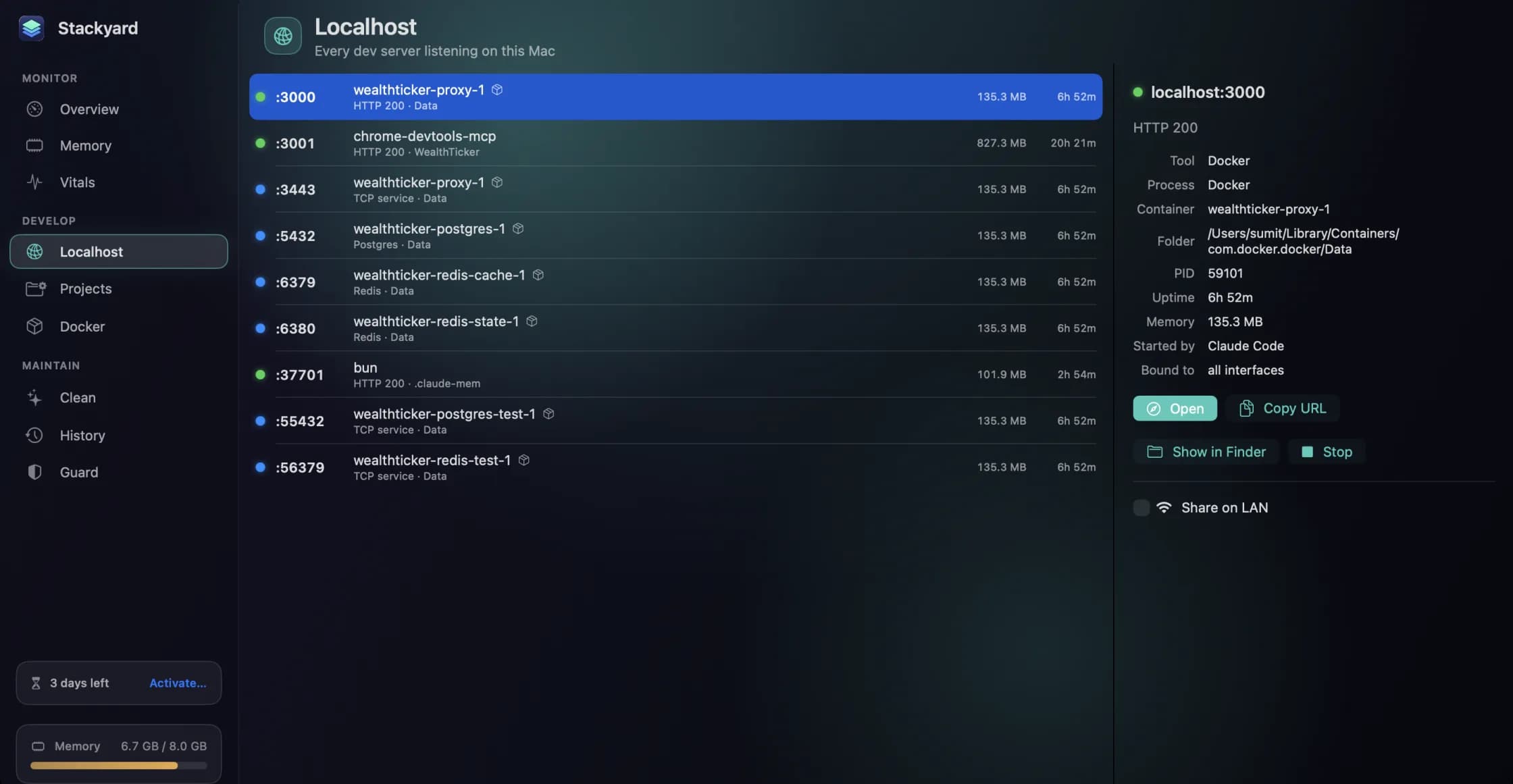
Stackyard is a menu-bar app for Mac developers, and its Localhost section (⌘4) lists every server listening on your Mac at once, each with a health dot: green for an HTTP server answering normally, red for a 5xx or no answer, blue for something that is not a web server, like Postgres or Redis.
For the situations above, that means:
- Who owns the port is the row itself. Ports opened by Docker show the container's name rather than
com.docker.backend, which removes a whole step. - Who started it is in the detail pane. A server left by VS Code, Cursor, Claude Code or a terminal tab says so, along with its PID, uptime and memory.
- Stopping it is a button. So are Open, Copy URL and Show in Finder.
- AirPlay's ports are hidden unless you press Show System Ports, so your list stays to the things that are yours.
- Homebrew services have on/off switches in the Docker section, with no need to recall the exact service name.
There is also the leftover problem. Orphans in the Memory section lists node and python processes whose terminal or editor has gone, and shows which tool left each one. That post goes through it. Guard can quit them for you after 15 minutes, 30 minutes or an hour, leaving databases and services like Postgres and Redis alone.
Preventing the clash next time
Add the folders where you keep code to Stackyard's Projects and it finds your dev and start scripts. Start a project from there, and if the port it needs is taken, Stackyard warns you before it starts, instead of leaving you to read a stack trace. Projects started from Stackyard also stop when you quit Stackyard, so they do not outlive the session.
If you only hit this once a month, the lsof line above is all you need, and you are welcome to it. If you hit it weekly, Stackyard is free for three days, then from $21 once, with no subscription. Download it from its page.
Questions people ask
- How do I see what is using a port on a Mac?
- Run lsof -nP -iTCP:3000 -sTCP:LISTEN in Terminal, replacing 3000 with your port. The COMMAND and PID columns tell you the process and its ID.
- Why is port 5000 in use when I have not started anything?
- On macOS Monterey and later, AirPlay Receiver listens on ports 5000 and 7000. lsof shows the owner as ControlCenter. Turn off AirPlay Receiver in System Settings › General › AirDrop & Handoff, or use a different port.
- Should I use kill -9?
- Only after a plain kill has failed. A plain kill lets the process shut down cleanly, which matters for anything holding a database or writing files. kill -9 ends it immediately with no chance to clean up.
Related reading
- AI coding agents leave a lot running on your Mac. How to keep up with themAgents start dev servers, spawn test browsers and create worktrees, then finish and move on. What that leaves behind in memory, ports and disk, the commands to check it, and how Stackyard shows which agent left what.
- Web development on an 8 GB Mac: how to make it work, and when to stop tryingPlenty of good Macs shipped with 8 GB and are still in daily use. Why the memory figure you are watching is the wrong one, the three changes that help most, and the honest signs that you need a new machine.
- Activity Monitor is free and already on your Mac. Here is what Stackyard addsActivity Monitor sees every process, and it is the right tool for a deep dive. What it does not do is think like a developer: group an app's helpers, tell you who left a node process running, put a health dot on a port, or start your project. An honest comparison.
Have a question about any of this?
Write in. The person who built the apps reads every message and replies within two working days.