 AppVerz
Blog / 11 November 2026
Checking Slack and email less: how to batch messages, and how to know it worked
Most people check messages dozens of times a day, and few could say how many. What the research says about checking less, a batching routine that survives a real job, the macOS settings that make it stick, and how to measure the habit instead of guessing.
Here is a question that is harder than it sounds: how many times did you open Slack yesterday?
Most people guess ten or fifteen. When they measure it, the number is usually several times that, and most of those visits are under a minute long. You were not reading a message. You were checking whether there was one.
Why checking costs more than it seems to
Each check takes seconds. The cost comes afterwards. Gloria Mark's research on interrupted work found that once people are pulled away from a task, it takes them a long time to get back to it, around twenty-three minutes on average. Not every check is a full interruption, but even a quick look leaves part of your attention on whatever you saw. We go through the arithmetic in the 23-minute cost of a context switch.
The best evidence that checking less helps comes from a 2015 study by Kostadin Kushlev and Elizabeth Dunn at the University of British Columbia. For one week, people checked email just three times a day. For another week, they checked whenever they liked. In the limited week they reported less daily stress. Same people, same jobs; the only change was how often they looked.
A batching routine that survives a real job
"Check email three times a day" works well in a study. In a job with a team and a manager, it needs a little adjusting.
- Pick your check times and put them in your calendar. For example: at the start of the day, before lunch, mid-afternoon and before you finish. Chat can be checked more often, every 45 to 90 minutes, but at times you choose rather than whenever a notification arrives.
- Tell people. Set a Slack status such as Heads down, checking messages at 11 and 3. People stop expecting an instant answer once they know when the answer will come.
- Agree on a way through for emergencies. A direct mention, a call, or a dedicated channel that does notify you. Batching only works if people can still reach you when it matters.
- Quit, do not hide. An app open in another window keeps its unread count in your Dock and in your head. Quit Slack and Mail between checks.
- When you check, deal with everything. Reply, file, or turn it into a task. A check that leaves things half-read just sends you back for another look.
Mac settings that make it stick
- Focus modes (System Settings › Focus): create a Work focus that silences everything except the people or apps you allow. Turn it on with a schedule or from Control Center.
- Mail's fetch schedule: in Mail › Settings › General, change Check for new messages to every 30 or 60 minutes, or Manually.
- Slack: Pause notifications for a set time, and turn off the red Dock badge in Slack's notification settings. The badge pulls at you just as much as a notification does.
- Dock badges for every app: in System Settings › Notifications, choose an app and turn off Badge application icon.
Measuring whether it worked
This is where most attempts to check less quietly fail. You change your settings, you feel better for a few days, and three weeks later you are back where you started without noticing. You need a number from before the change and a number from after it.
The numbers that describe a checking habit are:
- Sessions per day in each messaging app. This is the number of separate visits, which is the habit itself.
- Typical session length. Many very short sessions are checking. Fewer, longer ones are batching.
- Total time. This is the least useful of the three, because batching may not reduce it at all. You will spend similar time on messages, in a few sittings instead of fifty.
Measuring it with FocusLens
FocusLens records these numbers without you doing anything, and needs no permission to do it.
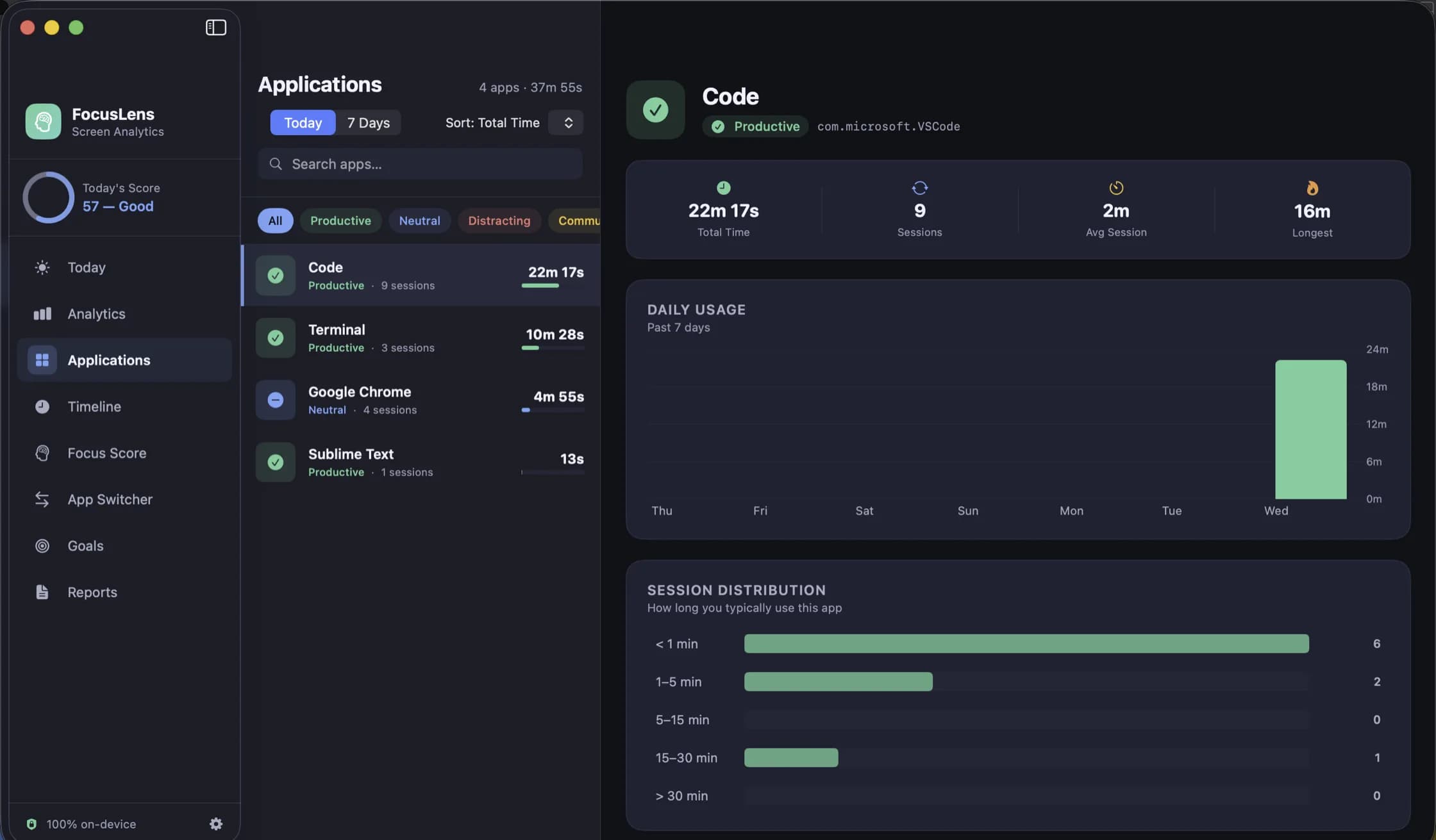
The Applications view shows one app at a time: total time, the number of sessions, the average and longest session, a daily usage chart and a breakdown of session lengths. Open Slack there after a normal week and you have your before number. Open it again after two weeks of batching. Success looks like the session count falling sharply and the average session getting longer.
Other places to look:
- App Switcher counts every switch between apps and your switches per hour, and ranks the apps that break your focus most. Fewer switches per hour is the other half of the result.
- The focus streak, your longest unbroken run of focused work, is the part of the score that batching improves most. Constant checking is exactly what keeps the streak short.
- Communication is its own category. Slack, Mail, Messages and Zoom are filed there, not under Distracting, so FocusLens does not treat reading messages as wasted time. If messages are the job, for example in support or operations, file the app as productive.
For each session, FocusLens records the app, its category, and when the session started and stopped. It does not record window titles, the pages you visit, message contents or keystrokes, and none of it leaves your Mac. It is free for three days, then $19.99 once. Download it from its page, leave it running for a normal week, then look up how many times you opened Slack.
Questions people ask
- How often should I check email and Slack?
- A study at the University of British Columbia found people were less stressed when they checked email three times a day than when they checked whenever they liked. For chat, every 45 to 90 minutes suits most jobs. Roles that answer customers or production alerts need a different arrangement, not no arrangement.
- Won't people think I am ignoring them?
- Usually not, if you tell them. Set a status that says when you next check, and agree a faster channel, such as a phone call or a named mention, for things that cannot wait an hour.
- Does FocusLens count Slack as a distraction?
- No. Slack, Mail, Messages and Zoom are filed under Communication, not Distracting. Switching to them does not lower the context-switching part of the score. If chat is your main work, file it as productive in Settings.
Related reading
- Time blocking on a Mac, and checking that the blocks actually happenedTime blocking works when you plan every hour of the day, and it fails quietly when the plan and the day drift apart. How to set it up with the Calendar app you already have, how to handle the day falling apart by lunchtime, and how to audit each block against what you really did.
- How many hours of deep work can you actually do in a day?Probably fewer than your calendar assumes, and more than a day of meetings allows. What the research on expert practice suggests, why four hours is a ceiling rather than a target, how to find your own number, and how to stop a good number from turning into an unrealistic goal.
- How to find your peak focus window, and test whether it is realFocusLens can name the hours you do your best work. That chart shows when you did focus, which is not always when you could. A two-week method for finding your window, separating it from your calendar, and proving it by moving your hardest task.
Have a question about any of this?
Write in. The person who built the apps reads every message and replies within two working days.